
Electronic Accessory User Manual


Table Of Contents
- 1. Getting Started
- 2. Quick Guide to Product Features
- 3. BOOKS Menu
- 3.1 Search Feature
- 3.2 Collins Dictionaries
- 3.3 Diccionario General de la Lengua Español Vox
- 3.4 Merriam-Webster’s Advanced Learner’s English Dictionary
- 3.5 Diccionario Merriam-Webster de Sinónimos y Antónimos en Inglés
- 3.6 Visual Dictionaries
- 3.7 Merriam-Webster’s ALD Supplemental Data
- 3.8 Franklin Thesaurus
- 3.9 Looking Up Inflections
- 3.10 Inflected Form Searching
- 3.11 Misspelling Words
- 3.12 Confusable Words
- 3.13 Uncertain Spellings
- 3.14 Searching for Idioms, Usage Examples and Collocations
- 3.15 Highlighting Words
- 3.16 Adding Words to My Word List
- 3.17 Hints on Inputting Words
- 4. LEARN Menu
- 5. EXERCISES Menu
- 6. TOOLS Menu
- 7. SETTINGS Menu
- 8. General Controls
- 9. PC Connections
- 10. Additional Information
- 11. Warranty Information
44
• PressF2 [Retry] to try again the same
exercise.
Changing the Settings
In the list of user names, press / to
select a user and then press F5 [Setting]
to change the settings.
1. In the setting menu, press / to
select an option and then press
. Press / to change the
settings in the pop-up menu and
then press OK / to conrm.
• Mode: Selects exercise or test mode.
In test mode, there is time limit for
each question. Scores are recorded
for level advancement and progress
check.
• Skills: Selects a skill level.
• Hints: Selects a dictionary to dene
words in the passages.
2. Press F1 [Conrm] when done.
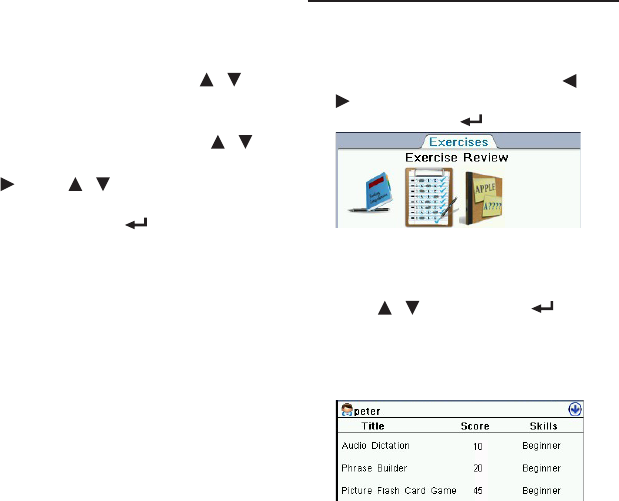
5.7 Exercise Review
In Exercise Review, you can check the
latest scores and current skill levels in all
exercises.
1. In the Exercises menu, press /
to select “Exercise Review” and
then press OK / .
2. Press F1 [User] to select a user and
review his/her scores and skill
levels.
• Press / and then OK / to
select a user.
3. Press F3 [Test] or F3 [Exercise] to
review the scores and skill levels in
the exercise or test mode.