
Electronic Accessory User Manual


Table Of Contents
- 1. Getting Started
- 2. Quick Guide to Product Features
- 3. BOOKS Menu
- 3.1 Search Feature
- 3.2 Collins Dictionaries
- 3.3 Diccionario General de la Lengua Español Vox
- 3.4 Merriam-Webster’s Advanced Learner’s English Dictionary
- 3.5 Diccionario Merriam-Webster de Sinónimos y Antónimos en Inglés
- 3.6 Visual Dictionaries
- 3.7 Merriam-Webster’s ALD Supplemental Data
- 3.8 Franklin Thesaurus
- 3.9 Looking Up Inflections
- 3.10 Inflected Form Searching
- 3.11 Misspelling Words
- 3.12 Confusable Words
- 3.13 Uncertain Spellings
- 3.14 Searching for Idioms, Usage Examples and Collocations
- 3.15 Highlighting Words
- 3.16 Adding Words to My Word List
- 3.17 Hints on Inputting Words
- 4. LEARN Menu
- 5. EXERCISES Menu
- 6. TOOLS Menu
- 7. SETTINGS Menu
- 8. General Controls
- 9. PC Connections
- 10. Additional Information
- 11. Warranty Information
3
Please read the following safety
warnings and precautions before using
your device. Note: If this device is to
be used by young children, this User’s
Guide should be read to them by an
adult and their use of the device should
be monitored. Failure to do so may
cause injury.
1. Getting Started
1.1 Charging the Battery
Your device is powered by a rechargeable
lithium polymer battery of capacity 600
mAh. When you see the low battery
warning, please recharge the battery.
Please charge the battery before your
rst use of the device.
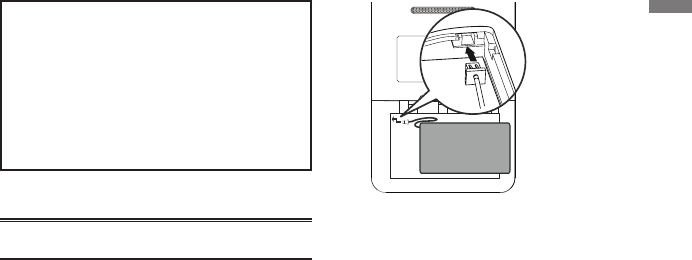
Installing the Battery For the
First Time
Follow these instructions to install the
battery for the rst time.
1. Turn your device over.
2. Open the battery cover on the back
of the unit.
3. Insert the battery by gently
connecting to the connector on
your device.
• Make sure the battery ts snugly
into the compartment after it is
connected.
4. Replace the battery compartment
door.
Charging the Battery with
your Computer
Plug the wide end of a USB cable into
a USB port on your computer and the
smaller end of the USB cable into the USB
port on your device. It generally takes
a few hours to completely recharge the
battery.
Charging the Battery with
the AC Adapter
1. Find the AC adapter and the
replaceable plugs included with
your device.
• Note:It may be necessary to attach a
1. Getting Started