
Electronic Accessory User Manual


Table Of Contents
- 1. Getting Started
- 2. Quick Guide to Product Features
- 3. BOOKS Menu
- 3.1 Search Feature
- 3.2 Collins Dictionaries
- 3.3 Diccionario General de la Lengua Español Vox
- 3.4 Merriam-Webster’s Advanced Learner’s English Dictionary
- 3.5 Diccionario Merriam-Webster de Sinónimos y Antónimos en Inglés
- 3.6 Visual Dictionaries
- 3.7 Merriam-Webster’s ALD Supplemental Data
- 3.8 Franklin Thesaurus
- 3.9 Looking Up Inflections
- 3.10 Inflected Form Searching
- 3.11 Misspelling Words
- 3.12 Confusable Words
- 3.13 Uncertain Spellings
- 3.14 Searching for Idioms, Usage Examples and Collocations
- 3.15 Highlighting Words
- 3.16 Adding Words to My Word List
- 3.17 Hints on Inputting Words
- 4. LEARN Menu
- 5. EXERCISES Menu
- 6. TOOLS Menu
- 7. SETTINGS Menu
- 8. General Controls
- 9. PC Connections
- 10. Additional Information
- 11. Warranty Information
33
4.6 Personal Dictionary
Use the Personal Dictionary to create
your own dictionaries on the device. You
can copy them to your PC for further
editing. A maximum of 50 dictionaries
can be created with up to 500 entries in
each dictionary.
Creating Dictionaries on the
Device
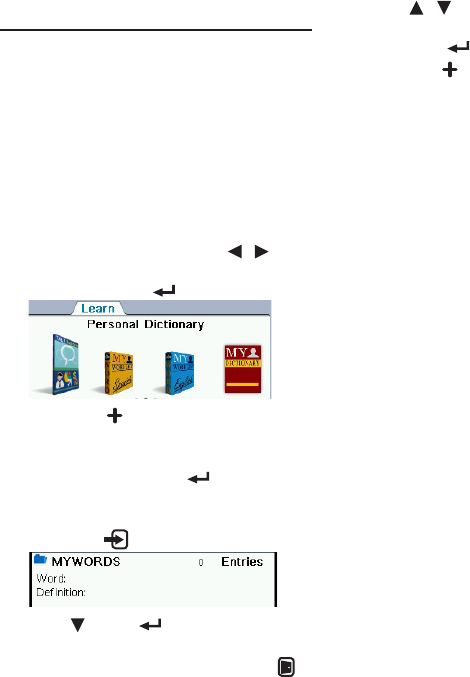
1. In the Learn menu, press / to
select “Personal Dictionary” and
then press OK / .
2. Press F1 [ ] to create a new
personal dictionary.
3. Create a name for the dictionary
and then press OK / .
4. Input a word and its denition in
the appropriate elds and then
press F1 [ ].
• Press , OK or to advance to the
next eld.
• Toquitwithoutsaving,pressF5 [ ].
5. Press / to select the dictionary
you have just created and then
press OK / .
6. Press F1 [ ] to add more words to
the dictionary.
Editing Personal Dictionaries
on PC
1. Connect the device to your PC.
• See9.1 Connecting to a PC.
2. Double-click “PersonalDict” to
open that folder.
3. In the folder, double-click to open
a personal dictionary le (.txt) with
a text editor.
4. Edit or add new words.
• Eachnewwordmuststartona
new line. Separate the headword
and its denition with a tab. Press
“Enter” after entering the denition,
including the last line.
5. Save the le and disconnect the
device from your PC.
• Note: You may also create your
custom dictionaries from scratch
on your PC. A template .txt le is
saved in the “PersonalDict” folder
of the device. Please copy it to your
PC and follow the format to create
dictionaries.