
Assembly Instructions




61
Hardware Installation
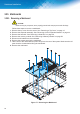
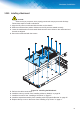
3.20.2. Installing a Mainboard
CAUTION:
:KHQUHPRYLQJDQ\FRPSRQHQWZHDUDSURSHUO\JURXQGHGVWDWLFVWUDSWRSUHYHQWVWDWLFGLVFKDUJH
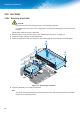
Follow these steps to install a mainboard:
1. Align the I/O ports on mainboard with the slots on the chassis.
2. Slide the mainboard into position. Make sure the I/O ports are seated correctly.
3. Lower the mainboard onto the chassis. Make sure the screw holes on the mainboard and
chassis are aligned.
4. Secure the mainboard with the screws.
)LJXUH ,QVWDOOLQJWKH0DLQERDUG
5. Perform the cable connections.
Install the memory module. See “Installing a Memory Module” on page 59.
7. Install the heat sink. See “Installing a Heat Sink” on page 57.
Install the expander assembly. See “Installing a K2V4 Expander Bracket” on page 45.
9. Replace the top cover on the server. See “Installing a Top Cover” on page 11.