
Assembly Instructions


58
Hardware Installation
3.19. Memory Modules
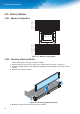
3.19.1. 0HPRU\&RQÀJXUDWLRQ
_0_C_
_1_C_
_0_C_7
_1_C_7
_0_C_
_1_C_
_0_C_3
_1_C_3
_1_C_1
_0_C_1
_1_C_0
_0_C_0
_1_C_5
_0_C_5
_1_C_4
_0_C_4
ain Pro e or
)LJXUH 0HPRU\&RQ¿JXUDWLRQ
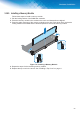
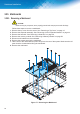
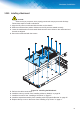
3.19.2. Removing a Memory Module
Follow these steps to remove a memory module:
1. Remove the top cover from the server. See “Removing a Top Cover” on page 10.
2. Push the locking latches of the DIMM slot downwards and outwards to eject the memory
module.
3. Remove the memory module.
)LJXUH 5HPRYLQJD0HPRU\0RGXOH
4. Repeat the steps for the remaining memory module.