
Installation Instructions


19
Hardware Installation
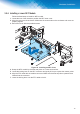
3.5.4. Installing a Lower NFC Module
Follow the listed steps to install an NFC module.
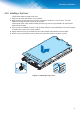
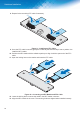
1. Locate the rear of the chassis to position the NFC outer cover.
2. Align the cover over the enclosure. Make sure the screw holes on the enclosure and cover are
properly aligned.
3. Secure the cover with the provided screws.
)LJXUH ,QVWDOOLQJDQ1)&&RYHU
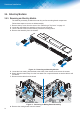
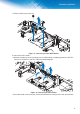
4. Grasp the NFC module by the ends and place on a clean work surface.
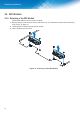
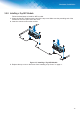
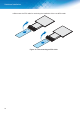
5. Locate the locking lever on the NFC connector and gently lift it up to expose the contact points.
Align the FFC cable with the module connector. Make sure the blue strip faces upwards when
inserted into the connector.
7. Lower the locking lever over the FFC cable to lock it.