
Installation Instructions


16
Hardware Installation
3.5.3. Removing a Lower NFC Module
Follow these steps to remove an NFC module:
1. Remove the top cover. See “Removing a Top Cover” on page 10.
2. Locate the lower NFC module at the rearside of the server.
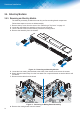
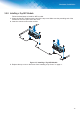
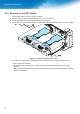
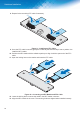
3. Locate the FFC connected to the NFC module and rotate the locking lever to the open position.
)LJXUH 'LVFRQQHFWLQJDQ))&&DEOH
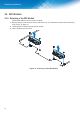
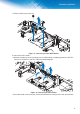
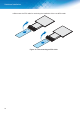
Once the FFC cable is disconnected, the NFC reader and NFC module can be removed.
To remove the NFC module:
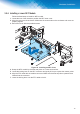
f Locate the FFC connected to the NFC module and rotate the locking lever to the open
position.
f Remove the securing screws from the module and move the ground cable off to the side to
prevent interference.