
Installation Instructions



25
Hardware Installation
3.6. Panel Mounts
3.6.1. Removing a Busbar
Follow these steps to remove a busbar cable:
1. Remove the top cover from the server. See “Removing a Top Cover” on page 10.
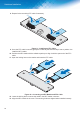
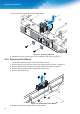
2. From the rear side, locate the busbar clip and remove the screws and washers securing it to the
server.
3. Pull out the busbar clip and remove it from the enclosure.
)LJXUH 5HPRYLQJD%XVEDU
3.6.2. Installing a Busbar
Follow these steps to install a busbar:
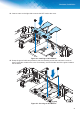
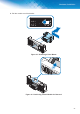
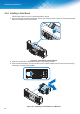
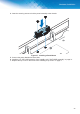
1. Align the busbar cable with the slot in the chassis.
2. ,QVHUWWKHEXVEDUFDEOHXQWLOLWLVÀXVKLQWKHFKDVVLV