
Assembly Instructions

31
Hardware Installation
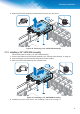
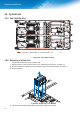
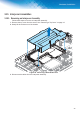
3. Slide the SATA SSD assembly to release and remove it from the server.
)LJXUH 5HPRYLQJD´6$7$66'$VVHPEO\
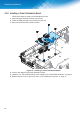
3.7.3. Installing a 2.5” SATA SSD Assembly
Follow these steps to install a 2.5” SATA SSD assembly:
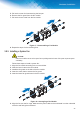
1. Connect the cables to the SATA SSD assembly. See “Storage Cable Routing” on page 30.
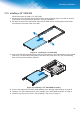
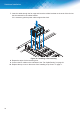
2. Align the keyhole on the SATA SSD assembly and slide in place.
3. Secure the SATA SSD assembly with a thumb screw.
)LJXUH ,QVWDOOLQJD´6$7$66'$VVHPEO\
4. Install the top cover on the server. See “Installing a Top Cover” on page 11.