
User's Manual






1
3
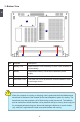
2. Rear View
No. Purpose
1
2 Netbook's screen
3 Power Button Button for turning the computer's power on/off
4 Keyboard Input device used for controlling the Netbook's
various functions
5 Touchpad Works the same way as a mouse and is used for
controlling the computer cursor
6 Works the same way as the right mouse button
7 Touchpad Lock Button Press the button to lock or unlock the touchpad
8 Left Touchpad Button Works the same way as the left mouse button
9 Computer Status Light From left to right:
Battery icon
Num Lock icon
Caps Lock icon
Wireless LAN on/off icon
No. Purpose
1 Battery
1