
User's Manual






1
6
1-2 Setting Up Your Computer
1. Installing/Removing the Battery
Please install the battery before using the Netbook and connect the external power supply
transformer. The Netbook can be powered by the battery or the external transformer.
the battery instead.
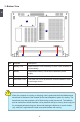
Installing the Battery
Step 1: Turn the Netbook over and have the back of the battery facing upwards as well.
Now push the end of the battery with the metal contacts into the Netbook's battery
slot evenly and slowly along the battery rails.
Step 2: Push the end of the Netbook battery with the metal contacts completely into the
battery slot. When there is a "click", this means the battery latch has engaged and
the battery is now secured to the Netbook.
Step 3: Push the Battery Lock inwards lightly to lock the battery in place.
1