
Operation Manual





www
www
.foscam.co
.foscam.co
m
m
Shenzhen
Shenzhen
Foscam
Foscam
Intelligent
Intelligent
Technology
Technology
Co.,
Co.,
Limited
Limited
Tel:
Tel:
86
86
755
755
2674
2674
5668
5668
Fax:
Fax:
86
86
755
755
2674
2674
5168
5168
12
1.8 The different features between the models involved
Differences
Model
Wireless
PoE (Power over
Ethernet)
Alarm in / out
Audio input /output
RS 485
P2P
FI9804W
√
×
×
√
×
×
FI9805W
√
×
×
√
×
×
FI9805E
×
√
√
√
√
×
FI9803EP
×
√
×
×
×
√
FI9803P
√
×
×
√
×
√
FI9903P
×
×
×
×
×
√
FI9900P
√
×
×
√
×
√
FI9900EP
×
√
×
√
×
√
FI9800P
√
×
×
√
×
√
FI9901EP
×
√
×
√
×
√
2 Access the IP Camera
2.1 Hardware Connection & Software Installation
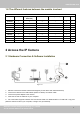
Figure 2.1
1. Mount the antenna and make it stand vertically(Only for the device with external antenna).
2. Connect the camera to the LAN network (Router or Switch) via network cable.
3. Connect the power adapter to the camera.
4. Insert the CD into the CD drive of your computer.
5. Go to the folder “Equipment Search Tool” and find the folder “For Windows OS”or “For Mac OS”. Copy and
paste the search tool file to your computer, or drag it onto your Desktop.