
Database Security System User Guide


FortiDB Version 3.2 Utilities User Guide
38 15-32000-81369-20081219
Custom Reports Report Manager
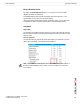
Generated HTML Report Example
1 Open Control Panel, and open Internet Options.
2 In the Internet Properties window, click the Security tab.
3 Select Trusted sites.
4 Click the Sites button. The Trusted sites dialog displays.
5 Enter URL of FortiDB host server (for example, http://myserver.mydomain.com
). If
you enter a URL with http:// prefix, you need to uncheck Require server
verification (https: ) for all sites in this zone check box.
6 Click the Add button.
7 Click the Close button.
8 Set the Security Level for this zone to Low.
9 Click OK.
Note: In order to export and save your report files in a tightly secured machine,
you might need to change the Internet Option settings of the machine. You can
change your Internet Option settings as follows: