
Owner’s Manual 2016







19
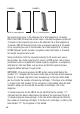
To release the slide when no magazine is in the pistol and the slide is
locked rearward, pull the slide to the rear to disengage the slide stop to
allow the slide to return to the forward position. You may also press
downward on the ambidextrous slide stop to release the slide.
10. LOADED CHAMBER
INDICATOR
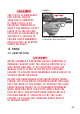
The loaded chamber indicator is
located at the right side of the slide
just behind the ejection port. If it is
protruding and showing a red
marking, this means that there is a
cartridge in the chamber (Figure 7).
DO NOT DEPEND ON THE
RED COLOR ALONE TO
INDICATE IF YOUR FIREARM IS LOADED. TIME, EXPOSURE
TO THE ELEMENTS, AND THE ABRASIVE ACTION OF
CLEANING AGENTS CAN ERASE IT. FAILURE TO FOLLOW
THIS WARNING COULD RESULT IN SERIOUS INJURY OR
DEATH.
11. BEFORE USING THE PISTOL
CARRY OUT THE FOLLOWING PROCEDURES BEFORE
HANDLING, STORING AND/OR TRANSPORTING YOUR
PISTOL. FAILURE TO FOLLOW THESE WARNINGS COULD
RESULT IN SERIOUS INJURY OR DEATH.
1. Press the ambidextrous magazine release in to eject the magazine.
If the magazine does not eject from the magazine well, press and
hold the ambidextrous magazine release while gently pulling on the
magazine bottom plate.
Ejection Port
Loaded Chamber
Indicator
FIGURE 7
The loaded chamber indicator showing a
cartridge is in the chamber.