
User Manual


Notebook User Guide
100
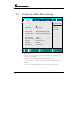
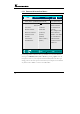
6.2.1 PRIMARY MASTER SUB-MENU
Phoenix BIOS Setup Utility
Main Advanced Security Boot Exit
Primary Master [SAMSUNG MP0603H-PM] Item Specific Help
T
yp
e:
[
Auto
]
User =
y
ou enter
LBA Format parameters of hard-disk
Total Sector: 117210240 drive installed at this
Maximum Capacity: 600012 MB connection.
Auto = autotypes Hard-
Multi-Sector Transfers: [16 Sectors] disk drive installed here.
LBA Mode Control: [Enabled] CD-ROM = a CD- ROM
32 Bit I/O: [Disabled] drive is installed here.
Transfer Mode: [FPIO 4 / DMA 2] ATAPI Removable=
Ultra DMA Mode: [Mode 5] removable disk drive is
installed here.
F1 Help
Ç È
Select Item -/+ Change Values F9 Setup Defaults
Esc Exit Å--> Select Menu Enter Select Sub-Menu F10 Save and Exit
Use the Type field to select the drive type installed. You can select different
drive types as CD-DVD, User, Auto or None by pressing <Space> bar. Set
this option to Auto so your computer will automatically detect the drive type
during power on. Set this option to None when your computer is not installed
any devices. Press <Esc> to return to the Main Menu.