A Sierra Monitor Company Driver Manual (Supplement to the FieldServer Instruction Manual) FS-8700-87 SDD16 APPLICABILITY & EFFECTIVITY Effective for all systems manufactured after May 1, 2001 Driver Version: 1.
FS-8700-87_SDD16 Driver Manual Table of Contents Table of Contents 1. 2. SDD16 DESCRIPTION ....................................................................................................3 DRIVER SCOPE OF SUPPLY .........................................................................................4 2.1. Supplied by FieldServer Technologies for this driver ..................................................4 3. 4. HARDWARE CONNECTIONS................................................................
FS-8700-87 SDD16 Driver Manual 1. Page 3 of 10 SDD16 Description The SDD16 driver allows the FieldServer to transfer data to and from devices over RS-485 using SDD16 protocol. The FieldServer can only emulate a Client. The SDD16 driver is used to communicate with a digital I/O module model 485SDD16. The current driver only supports reading the status of all sixteen digital input lines.
FS-8700-87 SDD16 Driver Manual 2. Page 4 of 10 Driver Scope of Supply 2.1. Supplied by FieldServer Technologies for this driver FieldServer Technologies PART # FS-8700-87 Description Driver Manual. FieldServer Technologies 1991 Tarob Court Milpitas, California 95035 USA Web:www.fieldserver.com Tel: (408) 262-2299 Fax: (408) 262-9042 Toll_Free: 888-509-1970 email: support@fieldserver.
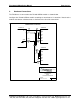
FS-8700-87 SDD16 Driver Manual 3. Page 5 of 10 Hardware Connections The FieldServer is connected to the RS-485 SDD16 module as shown below. Configure the RS-485 SDD16 module according to manufacturer’s instructions. Note that the module auto-detects valid baud rates as defined in the client side connections. !"## $%"# FieldServer Technologies 1991 Tarob Court Milpitas, California 95035 USA Web:www.fieldserver.
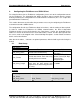
FS-8700-87 SDD16 Driver Manual 4. Page 6 of 10 Configuring the FieldServer as a SDD16 Client For a detailed discussion on FieldServer configuration, please refer to the configuration manual for the FieldServer. The information that follows describes how to expand upon the factory defaults provided in the configuration files included with the FieldServer (See “.csv” sample files provided with the FieldServer).
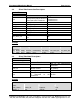
FS-8700-87 SDD16 Driver Manual 4.2. Page 7 of 10 Client Side Connection Descriptors Section Title Connections Column Title Function Legal Values R1-R2 Specify which port the device is FSx40 Servers connected to the FieldServer FSx20 Servers Specify baud rate 1200, 2400, 4800, 9600 None Specify parity 8 Specify data bits 1 Specify stop bits Specify protocol used SDD16 Specify hardware handshaking None Time to wait before driving line 0.
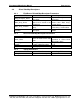
FS-8700-87 SDD16 Driver Manual 4.4. Page 8 of 10 Client Side Map Descriptors 4.4.1. FieldServer Related Map Descriptor Parameters Column Title Map_Descriptor_Name Data_Array_Name Data_Array_Location Function 4.4.2. Legal Values Up to 32 alphanumeric characters One of the Data Array names from “Data Array” section above 0 to maximum specified in “Data Array” section above RDBC Driver Related Map Descriptor Parameters Column Title Node_Name Data_Type* Length Address 4.4.3.
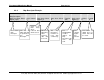
FS-8700-87 SDD16 Driver Manual 4.4.4. // Page 9 of 10 Map Descriptor Example. Client Side Map Descriptors Map Descriptors Map_Descriptor_Name, Scan_Interval, Data_Array_Name, Data_Array_Offset, Function, Node_name, Address, Length Digital_inputs, 1s, Digitals_0, 0, rdbc, Module_0, 0, 16 Name of this Map Descriptor. The rate at which data will be updated for this Map Descriptor. Name of the Data Array where retrieved data will be stored. Offset into Data Array where retrieved data will be stored.