Driver Manual (Supplement to the FieldServer Instruction Manual) FS-8700-70 WS3000 TABS APPLICABILITY & EFFECTIVITY Effective for all systems manufactured after May 1, 2001 Driver Version: 1.
FS-8700-70 WS3000 Tabs Manual Table of Contents TABLE OF CONTENTS 1. WS3000 TABS Description ..................................................................................................3 2. Driver Scope of Supply ........................................................................................................4 2.1. Supplied by FieldServer Technologies for this driver ...................................................4 2.2. Provided by user.....................................................
FS-8700-70 WS3000 Tabs Manual 1. Page 3 of 14 WS3000 TABS Description The Serial WS3000 TABS driver allows the FieldServer to transfer data to and from devices over either RS-232 or RS-422 using WS3000 TABS protocol. The FieldServer can emulate either a Server or Client. The WS3000 TABS driver is set up for Alarm Surveillance and Control. The protocol works over a multidrop RS-422 line or over a RS-232 line and allows only one master and up to 32 slaves on a serial channel.
FS-8700-70 WS3000 Tabs Manual 2. Page 4 of 14 Driver Scope of Supply 2.1. Supplied by FieldServer Technologies for this driver FieldServer Technologies PART # 25029 FS-8917-03 FS-8700-70 2.2. Description Cable Cat5 10-BASET w/Boot 7' Yelow Conn, DB9M to DCE, RTS/CTS, DSR/DTR Driver Manual. Provided by user The user has to provide a RS-422 cable for connecting the WS3000 to the RS-232 to RS422 converter. FieldServer Technologies 1991 Tarob Court Milpitas, California 95035 USA Web:www.fieldServer.
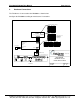
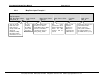
FS-8700-70 WS3000 Tabs Manual 3. Page 5 of 14 Hardware Connections The FieldServer is connected to the WS3000 as shown below. Configure the WS3000 according to manufacturer’s instructions.
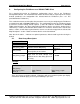
FS-8700-70 WS3000 Tabs Manual 4. Page 6 of 14 Configuring the FieldServer as a WS3000 TABS Client For a detailed discussion on FieldServer configuration, please refer to the FieldServer Configuration Manual. The information that follows describes how to expand upon the factory defaults provided in the configuration files included with the FieldServer (See “.csv” files provided with the FieldServer).
FS-8700-70 WS3000 Tabs Manual 4.2.
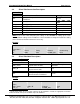
FS-8700-70 WS3000 Tabs Manual 4.4. Page 8 of 14 Client Side Map Descriptors 4.4.1. FieldServer Specific Map Descriptor Parameters Column Title Map_Descriptor_Name Data_Array_Name Data_Array_Location Function Name of this Map Descriptor Name of Data Array where data is to be stored in the FieldServer Starting location in Data Array Function Function of Client Map Descriptor Length The length of the Map Descriptor 4.4.2.
FS-8700-70 WS3000 Tabs Manual 4.4.4. // Page 9 of 14 Map Descriptor Example 1 Client Side Map Descriptors Map Descriptors Map_Descriptor_Name, Point_data_0, This can be any name but each name must be unique. Name will appear in FieldServer Map Descriptor status information screens. Scan_Interval, 1.0s, The rate at which the TABS device will be polled. Data_Array_Name, Points_0, The Data Array name must be one found under Data_Arrays.
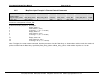
FS-8700-70 WS3000 Tabs Manual 4.4.5. // Page 10 of 14 Map Descriptor Example 2: Remote Control Commands Client Side Map Descriptors Map Descriptors Map_Descriptor_Name, Points_write, Data_Array_Name, Write_triggers, Data_Array_Offset, 0, Function, wrbx, Node_name, Tabs_0, Parms_DA, Write_parms, Parms_DA_Offset, 0, Length 1 Parameters arrangement in Parms_DA Position from Parms_DA_Offset 0 1 2 3 4 5 ..
FS-8700-70 WS3000 Tabs Manual 5. Page 11 of 14 Configuring the FieldServer as a WS3000 TABS Server For a detailed discussion on FieldServer configuration, please refer to the FieldServer Configuration Manual. The information that follows describes how to expand upon the factory defaults provided in the configuration files included with the FieldServer (See “.csv” files provided with the FieldServer).
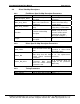
FS-8700-70 WS3000 Tabs Manual 5.2. Page 12 of 14 Server Side Node Descriptors Section Title Nodes Column Title Function Node_Name Provide name for node Legal Values Up to 32 alphanumeric characters TABS device station address 0-31 of physical Server node Specify protocol used Ws3000_tabs Port this node is connected to P1-P83 Node_ID Protocol Port Example // Server Side Nodes Nodes Node_Name, Tabs_0, 5.3. Node_ID, 0, Protocol, ws3000_tabs, Port P1 Server Side Map Descriptors 5.3.1.
FS-8700-70 WS3000 Tabs Manual 5.3.3. // Page 13 of 14 Map Descriptor Example. Server side Map Descriptors Map Descriptors Map_Descriptor_Name, Point_data_0, This can be any name but each name must be unique. Name will appear in FieldServer Map Descriptor status information screens. Data_Array_Name, Points_0, The Data Array name must be one found under Data_Arrays Data will be sent from this array to the device polling this TABS device.
FS-8700-70 WS3000 Tabs Manual Page 14 of 14 THIS PAGE INTENTIONALLY LEFT BLANK FieldServer Technologies 1991 Tarob Court Milpitas, California 95035 USA Web:www.fieldServer.com Tel: (408) 262-2299 Fax: (408) 262-9042 Toll_Free: 888-509-1970 email: support@fieldServer.