
User manual




5
PANEL FRONTAL
Cuandoseaccioneelbotóndeencendido,laluzsituadaencimaseiluminará,indicandoquehaycorrienteParaapagar
volveraaccionardichobotónenladirecciónopuestaAntesdeaccionarelbotón,ponerelvolumenbajoparaevitardañar
losaltavocesNótesequeelcircuitodeproteccióndelosaltavoceslosdejaensilenciounossegundosdespuésdehaber
encendidolaunidad
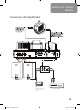
Controles del amplificador
NOTE:
Although product is pictured without the cage cover, the cage
covering the tubes must be in place during operation. This product
can get hot. Keep away from babies and children
Power buttonInput select IR receiver LED Volume
PANEL TRASERO
Speaker Outputs S-Video Output
Composite Video Output
AC Power Input
ATTENTION:
Your iTube should only be
re-started 5 minutes after switching off, to
avoid damaging the tubes.
! !
MANUAL DEL USUARIO
ESPAÑOL
Line Inputs
Carbon 2 Oct08 ES.indd 5 21/10/08 13:39:04