
- FARGO Electronics Single-Side Printer User Guide
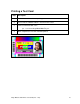
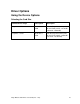
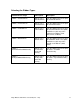
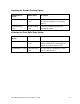
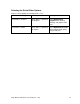
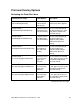
Table Of Contents
- Supported Linux Distributions
- Installation Procedures
- Printing a Sample Card
- Printer Maintenance
- Driver Options
- Using the Device Options
- Print and Overlay Options
- Magnetic Encoding Options
- Sending ISO Magnetic Encoding Information
- Sending JIS II Magnetic Encoding Information
- Sending RAW Magnetic Encoding Information
- Reviewing the URL Encoding Reference
- Reviewing the ASCII Code and Character Table
- Using the Image Color Capabilities
- Using the Image Position Function

Fargo M30e CUPS Driver User Guide (Rev. 1.0.3)
16
Driver Options
Using the Device Options
Selecting the Card Size
Command Line Usage
CUPS option
Description
PageSize = CR80
Media Size =
CR80
Sets the Page Size for the print
job to CR-80 (3.375"L x 2.125"W
/ 85.6mmL x 54mmW).
PageSize = CR79
Media Size =
CR79
Sets the Page Size for the print
job to CR-79 (3.295"L x 2.043"W
/ 83.7mmL x 51.9mmW).