
- FARGO Electronics Single-Side Printer User Guide
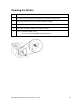
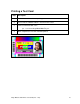
Table Of Contents
- Supported Linux Distributions
- Installation Procedures
- Printing a Sample Card
- Printer Maintenance
- Driver Options
- Using the Device Options
- Print and Overlay Options
- Magnetic Encoding Options
- Sending ISO Magnetic Encoding Information
- Sending JIS II Magnetic Encoding Information
- Sending RAW Magnetic Encoding Information
- Reviewing the URL Encoding Reference
- Reviewing the ASCII Code and Character Table
- Using the Image Color Capabilities
- Using the Image Position Function

Fargo M30e CUPS Driver User Guide (Rev. 1.0.3)
14
Cleaning the Printer
Step
Description
1
Remove all cards from the Card Hopper and close the Hopper door.
2
Open the Front Cover and remove the Ribbon Cartridge.
3
Remove the paper backing from both sides of the Cleaning Card.
4
Place the Cleaning card into the Single Feed Slot.
5
From a terminal window, enter:
lpr -l “/usr/share/fargo/M30e/CleanPrinter.prn”