
Specifications


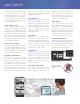




Computer Lab
Classroom
Lecture Hall
MLC 226 IP
MediaLink Controller becomes inoperable. No
functions of the controller or IR remote can be
activated, although it is still accessible via IR,
serial RS-232, or IP Link. This feature safeguards
the system from unauthorized access.
Control Modules
There is a wide selection of Extron Control
Modules available for customized remote control
of external devices such as VCRs, DVD players,
and audio tape decks, as well as screens,
lighting, and basic audio adjustments. Integrating
DVD and VCR Control Modules into a MediaLink
system eliminates the clutter and confusion that
comes with multiple handheld remote controls.
Versatile Mounting Options
Several mounting options are available for the
MLC 226 IP. Additional mounting kits are available
for local input expansion, adding transport controls,
or to accommodate installation in a lectern,
external wall box, equipment rack, or desk.
The Extron MLC 226 IP MediaLink Controller
is an enhanced control panel for controlling
A/V equipment in any classroom or conference
room. It standardizes the control interface for
all systems, making display systems simple
to use. Standardization also makes setup and
maintenance easier to support.
IP Link
®
Ethernet Control
The MLC 226 IP is equipped with Extron’s
IP Link, an IP integration technology specifi cally
engineered to meet the needs of professional
A/V environments — from small K-12 classrooms to
large universities and businesses. The MLC 226 IP
is fully supported by our Free GlobalViewer
®
Web-
based A/V resource management application
and GlobalViewer
®
Enterprise server-based A/V
resource management software.
Universal Projector Control
The MLC 226 IP is equipped with a dedicated port
for communicating with virtually any projector or
display via IR or bidirectional RS-232. Hundreds
of device drivers are available for download at no
charge from our Web site at www.extron.com.
Confi gurable, Backlit Buttons
With the MLC 226 IP, presenters with little
or no training can walk into any multimedia
classroom and operate the A/V system.
The backlit buttons on all MediaLink Controllers
are configurable to control input switching,
power, and volume. Because the buttons
illuminate, they are simple to see and operate
in low-light environments. In addition, the backlit
buttons can be custom-labeled. A sheet of pre-
printed text and icon-based labels is included
with each MediaLink Controller to facilitate quick
and trouble-free identification.
Macro Capability
The backlit source selection and room control
buttons of the MediaLink Controllers can be
configured to execute multiple actions through
serial RS-232 and IR control ports. For instance,
the touch of a single button can trigger commands
to turn on a projector, select the projector’s
computer video input, and select a source input
on a MediaLink Switcher.
Room Control
External devices such as lighting, screens,
projector lifts, or other products can be controlled
via internal relays found on the MLC 226 IP. The
relays can be activated through the front panel,
SCP 226 Secondary Control Panel, optional
IR 402 infrared handheld infrared remote,
serial RS-232, or free Extron software.
Inactivity Timer
All MediaLink Controllers feature an adjustable
timer that automatically shuts down the projector
or display to conserve energy and projector lamp
life. The timer is triggered when front panel
operations remain dormant, and is based on an
adjustable, user-defined period of up to 12 hours
in 30-minute increments.
Front Panel Security Lockout
Every MediaLink Controller features Front
Panel Security Lockout. When the lockout
mode is engaged, the front panel of the
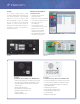
MLC 226 IP shown with IRCM-DV+
DVD/VCR Control Module
MLC 226 IP
Extron Control Modules
eliminate the need for multiple
remotes.
Free GlobalViewer
®
works in conjunction with the MLC 226 IP to support and control A/V systems in a
single building or across an entire campus.