
User Guide User Manual



FOX 3G DVC • Operation 20
NOTES: • The original factory-installed firmware is permanently available on the
FOX 3G DVC. If the attempted firmware upload fails for any reason, the
converter reverts to the factory-installed firmware.
• When downloaded from the Extron website, by default the firmware is
placed in a folder at C:\Program Files\Extron\Firmware\DVC 501 SD
or
C:\Program Files (x86)\Extron\Firmware\FOX 3G DVC (for
Windows 7).
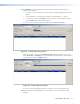
10. On the Add Device window, the path to the new firmware file is displayed in the Path
field.
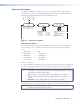
11. Click Add. The Add Device window closes, and the FOX 3G DVC name and information
appear in the Devices section.
Figure 22. Firmware Loader Window with a FOX 3G DVC Device Added