
- Extron Electronics Multi-Graphic Processor User's Manual
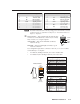
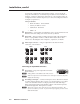
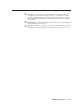
Table Of Contents
- Chapter One
- Introduction
- Chapter Two
- Installation
- Chapter Three
- Operation
- Front Panel Features
- Power-up and Default Cycle
- Window Select Buttons
- Input Selection
- Menus, Configuration, and Adjustments
- Picture Controls
- Auto Memories
- Memory Presets
- Additional Features
- Chapter Four
- Software Configuration and Control
- Chapter Five
- HTML Configuration and Control
- Accessing the Web Pages
- Viewing System Status
- Using the Configuration Page
- Using the File Management Page
- Using the Control Page
- Using the Background Page
- Chapter Six
- Special Applications
- Appendix A
- Specifications, Part Numbers, and Accessories
- Appendix B
- Firmware Update Guide

2-9
MGP 464 • Installation
PRELIMINARY
j
DVI inputs — Connect up to four (MGP 464 DI) or two (MGP 464 HD-SDI)
DVI input sources to these DVI input connectors, as an alternative to using
the fully-congurable BNC input connectors (
a
). These inputs are available
only on the MGP 464 DI and MGP 464 HD-SDI models, which have the DVI
card installed.
k
HD-SDI inputs — (MGP 464 HD-SDI only) Connect up to two HD-SDI inputs
to these HD-SDI input connectors.
l
AC power connector — Plug the power cord provided with the MGP 464 into
this connector to connect the MGP to a 100–250 VAC, 50/60 Hz power source.