
Managing Faults on Virtual Services Platform 7200 Series and 8000 Series Version 5
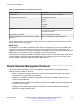
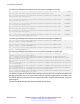
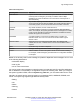
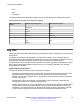
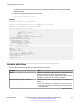
Table Of Contents
- Contents
- Chapter 1: Introduction
- Chapter 2: New in this document
- Chapter 3: Fault management fundamentals
- Chapter 4: Key Health Indicators using ACLI
- Chapter 5: Key Health Indicators using EDM
- Chapter 6: Link state change control using ACLI
- Chapter 7: Link state change control using EDM
- Chapter 8: RMON configuration using ACLI
- Chapter 9: RMON configuration using EDM
- Enabling RMON globally
- Enabling RMON on a port or VLAN
- Viewing the protocol directory
- Viewing the data source for protocol distribution statistics
- Viewing protocol distribution statistics
- Viewing the host interfaces enabled for monitoring
- Viewing address mappings
- Viewing the data source for host statistics
- Viewing network host statistics
- Viewing application host statistics
- Chapter 10: Log and trap fundamentals
- Chapter 11: Log configuration using ACLI
- Chapter 12: Log configuration using EDM
- Chapter 13: SNMP trap configuration using ACLI
- Chapter 14: SNMP trap configuration using EDM
- Glossary

Configure optional syslog host parameters by using the variables in the following variable
definition tables.
8. View the configuration to ensure it is correct:
show syslog [host <1–10>]
Example
Switch:1(config)# syslog enable
Switch:1(config)# syslog host 1 address 47.17.143.52
Switch:1(config)# syslog host 1 enable
Switch:1(config)#show syslog host 1
Id : 1
IpAddr : 47.17.143.52
UdpPort : 515
Facility : local7
Severity : info|warning|error|fatal
MapInfoSeverity : info
MapWarningSeverity : warning
MapErrorSeverity : error
MapMfgSeverity : notice
MapFatalSeverity : emergency
Enable : true
Switch:1(config)#show syslog
Enable : true
Max Hosts : 5
OperState : active
header : default
Total number of configured hosts : 1
Total number of enabled hosts : 1
Configured host : 1
Enabled host : 1
Variable definitions
Use the data in the following table to use the syslog command.
Variable Value
enable Enables the sending of syslog messages on the device. The
default is disabled. Use the no operator before this
parameter, no syslog enable to disable the sending of syslog
messages on the device. The default is enabled.
ip-header-type <circuitless-ip|default> Specifies the IP header in syslog packets to circuitless-ip or
default.
• If the value is default, the IP address of the VLAN is used
for syslog packets that are transmitted in-band using input/
output (I/O) ports.
Table continues…
Log configuration using ACLI
December 2015 Managing Faults on Avaya VSP 7200 Series and 8000 Series 60
Comments on this document? infodev@avaya.com