
Managing Faults on Virtual Services Platform 7200 Series and 8000 Series Version 5
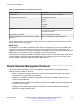
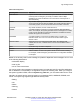
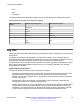
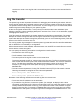
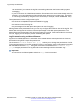
Table Of Contents
- Contents
- Chapter 1: Introduction
- Chapter 2: New in this document
- Chapter 3: Fault management fundamentals
- Chapter 4: Key Health Indicators using ACLI
- Chapter 5: Key Health Indicators using EDM
- Chapter 6: Link state change control using ACLI
- Chapter 7: Link state change control using EDM
- Chapter 8: RMON configuration using ACLI
- Chapter 9: RMON configuration using EDM
- Enabling RMON globally
- Enabling RMON on a port or VLAN
- Viewing the protocol directory
- Viewing the data source for protocol distribution statistics
- Viewing protocol distribution statistics
- Viewing the host interfaces enabled for monitoring
- Viewing address mappings
- Viewing the data source for host statistics
- Viewing network host statistics
- Viewing application host statistics
- Chapter 10: Log and trap fundamentals
- Chapter 11: Log configuration using ACLI
- Chapter 12: Log configuration using EDM
- Chapter 13: SNMP trap configuration using ACLI
- Chapter 14: SNMP trap configuration using EDM
- Glossary

Table 4: Log commands accessible for various users
Access level role Commands
Administrator The remove and delete commands.
No user at any access level. The following commands:
•
more
•
edit
•
rename
•
copy
Administrator All configuration commands can only be accessed by
the individual in the administrator role, other than the
preceding commands.
Administrator and auditor All show commands for log files.
All users (Administrator, auditor, security, privilege,
operator)
All show commands for log configurations.
With enhanced secure mode enabled, authorized users can use SFTP to transfer files to a remote
server with the content encrypted.
SNMP traps
The SNMP trap is an industry-standard method used to manage events. You can set SNMP traps
for specific types of log message (for example, warning or fatal), from specific applications, and
send them to a trap server for further processing. For example, you can configure the switch to send
SNMP traps to a server after a port is unplugged or if a power supply fails.
This document only describes SNMP commands related to traps. For more information about how to
configure SNMP community strings and related topics, see Configuring Security on Avaya Virtual
Services Platform 7200 Series and 8000 Series, NN47227-601.
Simple Network Management Protocol
The Simple Network Management Protocol (SNMP) provides facilities to manage and monitor
network resources. SNMP consists of:
• Agents—An agent is software that runs on a device that maintains information about device
configuration and current state in a database.
• Managers—An SNMP manager is an application that contacts an SNMP agent to query or
modify the agent database.
• The SNMP protocol—SNMP is the application-layer protocol SNMP agents and managers use
to send and receive data.
• Management Information Bases (MIB)—The MIB is a text file that specifies the managed
objects by an object identifier (OID).
Log and trap fundamentals
December 2015 Managing Faults on Avaya VSP 7200 Series and 8000 Series 52
Comments on this document? infodev@avaya.com