
Managing Faults on Virtual Services Platform 7200 Series and 8000 Series Version 5

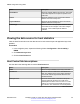
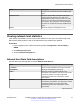
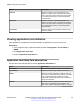
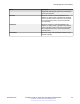
Table Of Contents
- Contents
- Chapter 1: Introduction
- Chapter 2: New in this document
- Chapter 3: Fault management fundamentals
- Chapter 4: Key Health Indicators using ACLI
- Chapter 5: Key Health Indicators using EDM
- Chapter 6: Link state change control using ACLI
- Chapter 7: Link state change control using EDM
- Chapter 8: RMON configuration using ACLI
- Chapter 9: RMON configuration using EDM
- Enabling RMON globally
- Enabling RMON on a port or VLAN
- Viewing the protocol directory
- Viewing the data source for protocol distribution statistics
- Viewing protocol distribution statistics
- Viewing the host interfaces enabled for monitoring
- Viewing address mappings
- Viewing the data source for host statistics
- Viewing network host statistics
- Viewing application host statistics
- Chapter 10: Log and trap fundamentals
- Chapter 11: Log configuration using ACLI
- Chapter 12: Log configuration using EDM
- Chapter 13: SNMP trap configuration using ACLI
- Chapter 14: SNMP trap configuration using EDM
- Glossary

Name Description
InOctets Shows the number of octets transmitted to this
address, excluding octets in packets that contained
errors. This value counts octets in the entire packet
that contained the protocol, not just the particular
protocol frames.
OutOctets Shows the number of octets transmitted by this
address, excluding octets in packets that contained
errors. This value counts octets in the entire packet
that contained the protocol, not just the particular
protocol frames.
CreateTime Shows the value of the sysUpTime when the entry
was last activated.
Viewing application host statistics
View application host statistics to see traffic statistics by application protocol for each host.
Procedure
1. In the navigation pane, expand the following folders: Configuration > Serviceability >
RMON.
2. Click Application Layer Host.
3. Click the Application Host Stats tab.
Application Host Stats field descriptions
Use the data in the following table to use the Application Host Stats tab.
Name
Description
LocalIndex Shows a unique identifier for the entry in the table.
HostAddress Identifies the network layer address of this entry.
InPkts Shows the number of packets for this protocol type,
without errors, transmitted to this address. This value
is the number of link-layer packets so a single,
fragmented network-layer packet can increment the
counter several times.
OutPkts Shows the number of packets for this protocol type,
without errors, transmitted by this address. This
value is the number of link-layer packets so a single,
Table continues…
RMON configuration using EDM
December 2015 Managing Faults on Avaya VSP 7200 Series and 8000 Series 48
Comments on this document? infodev@avaya.com