
Managing Faults on Virtual Services Platform 7200 Series and 8000 Series Version 5
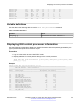
Table Of Contents
- Contents
- Chapter 1: Introduction
- Chapter 2: New in this document
- Chapter 3: Fault management fundamentals
- Chapter 4: Key Health Indicators using ACLI
- Chapter 5: Key Health Indicators using EDM
- Chapter 6: Link state change control using ACLI
- Chapter 7: Link state change control using EDM
- Chapter 8: RMON configuration using ACLI
- Chapter 9: RMON configuration using EDM
- Enabling RMON globally
- Enabling RMON on a port or VLAN
- Viewing the protocol directory
- Viewing the data source for protocol distribution statistics
- Viewing protocol distribution statistics
- Viewing the host interfaces enabled for monitoring
- Viewing address mappings
- Viewing the data source for host statistics
- Viewing network host statistics
- Viewing application host statistics
- Chapter 10: Log and trap fundamentals
- Chapter 11: Log configuration using ACLI
- Chapter 12: Log configuration using EDM
- Chapter 13: SNMP trap configuration using ACLI
- Chapter 14: SNMP trap configuration using EDM
- Glossary

Variable definitions
Use the data in the following table to use the link-flap-detect command.
Table 3: Variable definitions
Variable Value
<auto-port-down> Automatically disables the port if state changes exceed the link-flap
threshold. By default, auto-port-down is enabled. Use the no operator to
remove this configuration. To set this option to the default value, use the
default operator with the command.
frequency <1-9999> Configures the number of changes that are permitted during the time
specified by the interval command.
The default is 20. To set this option to the default value, use the default
operator with the command.
interval <2-600> Configures the link-flap-detect interval in seconds.
The default value is 60. To set this option to the default value, use the
default operator with the command.
send-trap Activates traps transmission. The default setting is activated. Use the no
operator to remove this configuration. To set this option to the default
value, use the default operator with the command.
Displaying link state changes
Displays link flap detection state changes on a physical port.
Procedure
1. Enter Privileged EXEC mode:
enable
2. Display link state changes:
show link-flap-detect
Example
Switch:1>enable
Switch:1#show link-flap-detect
Auto Port Down : enable
Send Trap : enable
Interval : 60
Frequency : 20
Link state change control using ACLI
December 2015 Managing Faults on Avaya VSP 7200 Series and 8000 Series 30
Comments on this document? infodev@avaya.com