
Managing Faults on Virtual Services Platform 7200 Series and 8000 Series Version 5.1.2
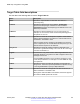
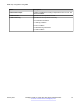
Table Of Contents
- Contents
- Chapter 1: Introduction
- Chapter 2: New in this document
- Chapter 3: Fault management fundamentals
- Chapter 4: Key Health Indicators using ACLI
- Chapter 5: Key Health Indicators using EDM
- Chapter 6: Link state change control using ACLI
- Chapter 7: Link state change control using EDM
- Chapter 8: Log and trap fundamentals
- Chapter 9: Log configuration using ACLI
- Configuring a UNIX system log and syslog host
- Configuring secure forwarding
- Installing root certificate for syslog client
- Configuring logging
- Configuring the remote host address for log transfer
- Configuring system logging
- Configuring system message control
- Extending system message control
- Viewing logs
- Configuring ACLI logging
- Chapter 10: Log configuration using EDM
- Chapter 11: SNMP trap configuration using ACLI
- Chapter 12: SNMP trap configuration using EDM
- Glossary

Name Description
AuthenticationTraps Enables or disables the sending of traps after an error occurs. The
default is disabled.
LastErrorCode Specifies the last reported error code.
LastErrorSeverity Specifies the last reported error severity:
0= Informative Information
1= Warning Condition
2= Error Condition
3= Manufacturing Information
4= Fatal Condition
SNMP trap configuration using EDM
January 2017 Managing Faults on Avaya VSP 7200 Series and 8000 Series 70
Comments on this document? infodev@avaya.com