
Managing Faults on Virtual Services Platform 7200 Series and 8000 Series Version 5.1.2

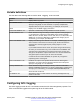
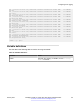
Table Of Contents
- Contents
- Chapter 1: Introduction
- Chapter 2: New in this document
- Chapter 3: Fault management fundamentals
- Chapter 4: Key Health Indicators using ACLI
- Chapter 5: Key Health Indicators using EDM
- Chapter 6: Link state change control using ACLI
- Chapter 7: Link state change control using EDM
- Chapter 8: Log and trap fundamentals
- Chapter 9: Log configuration using ACLI
- Configuring a UNIX system log and syslog host
- Configuring secure forwarding
- Installing root certificate for syslog client
- Configuring logging
- Configuring the remote host address for log transfer
- Configuring system logging
- Configuring system message control
- Extending system message control
- Viewing logs
- Configuring ACLI logging
- Chapter 10: Log configuration using EDM
- Chapter 11: SNMP trap configuration using ACLI
- Chapter 12: SNMP trap configuration using EDM
- Glossary

Variable definitions
Use the data in the following table to use the show logging file command.
Variable Value
alarm Displays alarm log entries.
CPU WORD <0-100> Filters and lists the logs according to the CPU that generated the message.
Specify a string length of 0-25 characters. To specify multiple filters,
separate each CPU by the vertical bar (|), for example, CPU1|CPU2.
detail Displays CLI and SNMP logging information.
event-code WORD<0–10> Specifies a number that precisely identifies the event reported.
module WORD<0-100> Filters and lists the logs according to module. Specifies a string length of
0–100 characters. Categories include SNMP, EAP, RADIUS, RMON,
WEB, HW, MLT, FILTER, QOS, CLILOG, SW, CPU, IP, VLAN, IPMC, and
SNMPLOG. To specify multiple filters, separate each category by the
vertical bar (|), for example, |FILTER|QOS.
name-of-file WORD<1-99> Displays the valid logs from this file. For example, /intflash/logcopy.txt. You
cannot use this command on the current log file, the file into which the
messages are currently logged. Specify a string length of 1 to 99
characters.
If you enable enhanced secure mode, the system encrypts the entire log
file. After you use the show log file name-of-file WORD<1–99>
command, the system takes the encrypted log file name as input, then
decrypts it, and prints the output to the screen. You can then redirect the
decrypted output to a file that you can store onto the flash.
If enhanced secure mode is disabled, the system only encrypts the
proprietary portion of the log file.
save-to-file WORD<1-99> Redirects the output to the specified file and removes all encrypted
information. You cannot use the tail option with the save-to-file option.
Specify a string length of 1–99 characters.
severity WORD<0-25> Filters and lists the logs according to severity. Choices include INFO,
ERROR, WARNING, and FATAL. To specify multiple filters, separate each
severity by the vertical bar (|), for example, ERROR|WARNING|FATAL.
tail Shows the last results first.
vrf WORD<0–32> Specifies the name of a VRF instance to show log messages that only
pertain to that VRF.
Configuring ACLI logging
Use ACLI logging to track all ACLI commands executed and for fault management purposes. The
ACLI commands are logged to the system log file as CLILOG module.
Configuring ACLI logging
January 2017 Managing Faults on Avaya VSP 7200 Series and 8000 Series 53
Comments on this document? infodev@avaya.com