
Managing Faults on Avaya Virtual Services Platform 7200 Series and 8000 Series Version 4.2.1
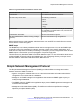
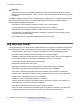
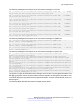
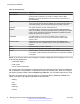
Table Of Contents
- Contents
- Chapter 1: Introduction
- Chapter 2: New in this release
- Chapter 3: Fault management fundamentals
- Chapter 4: Key Health Indicators using ACLI
- Chapter 5: Key Health Indicators using EDM
- Chapter 6: Link state change control using ACLI
- Chapter 7: Link state change control using EDM
- Chapter 8: RMON configuration using ACLI
- Chapter 9: RMON configuration using EDM
- Enabling RMON globally
- Enabling RMON on a port or VLAN
- Enabling RMON1 history
- Disabling RMON1 history
- Viewing RMON1 history statistics
- Creating an RMON1 alarm
- Creating an RMON1 port history alarm
- Viewing RMON1 alarms
- Deleting an RMON1 alarm
- Creating a default RMON1 event
- Creating a nondefault RMON1 event
- Viewing RMON1 events
- Viewing the RMON log
- Deleting an event
- Viewing the protocol directory
- Viewing the data source for protocol distribution statistics
- Viewing protocol distribution statistics
- Viewing the host interfaces enabled for monitoring
- Viewing address mappings
- Viewing the data source for host statistics
- Viewing network host statistics
- Viewing application host statistics
- Chapter 10: Viewing statistics using ACLI
- Chapter 11: Viewing statistics using EDM
- Chapter 12: Log and trap fundamentals
- Chapter 13: Log configuration using ACLI
- Chapter 14: Log configuration using EDM
- Chapter 15: SNMP trap configuration using ACLI
- Chapter 16: SNMP trap configuration using EDM
- Chapter 17: RMON alarm variables
- Glossary

Table 10: Severity levels
Severity level Definition
EMERGENCY A panic condition that occurs when the system becomes unusable. Usually
a severity level of emergency is usually a condition where multiple
applications or server are affected. You must correct a severity level of
alert immediately.
ALERT Any condition requiring immediate attention and correction. You must
correct a severity level of alert immediately, but usually indicates failure of
a secondary system, such as an Internet Service Provider connection.
CRITICAL Any critical conditions, such as a hard drive error.
ERROR A nonfatal condition occurred. You can be required to take appropriate
action. For example, the system generates an error message if it is unable
to lock onto the semaphore required to initialize the IP addresses used to
transfer the log file to a remote host.
WARNING A nonfatal condition occurred. No immediate action is needed. An
indication that an error can occur if action is not taken within a given
amount of time.
NOTIFICATION Significant event of a normal and normal nature. An indiciation that
unusual, but not error, conditions have occurred. No immediate action is
required.
INFO Information only. No action is required.
DEBUG Message containing information useful for debugging.
FATAL A fatal condition occurred. The system cannot recover without restarting.
For example, a fatal message is generated after the configuration database
is corrupted.
Based on the severity code in each message, the platform dispatches each message to one or more
of the following destinations:
• workstation display
• local log file
• one or more remote hosts
You can log system log messages to external system log hosts with both IPv4 and IPv6 addresses
with no difference in functionality or configuration except in the following case. When you configure
the system log table in EDM, under the System Log Table tab, you must select either IPv4 or IPv6.
Internally, the switch has four severity levels for log messages: INFO, WARNING, ERROR, and
FATAL. The system log supports eight different severity levels:
• Debug
• Info
• Notice
• Warning
• Critical
Log and trap fundamentals
78 Managing Faults on Avaya VSP 7200 Series and 8000 Series June 2015
Comments on this document? infodev@avaya.com