
Managing Faults on Avaya Virtual Services Platform 7200 Series and 8000 Series Version 4.2.1
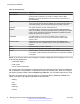
Table Of Contents
- Contents
- Chapter 1: Introduction
- Chapter 2: New in this release
- Chapter 3: Fault management fundamentals
- Chapter 4: Key Health Indicators using ACLI
- Chapter 5: Key Health Indicators using EDM
- Chapter 6: Link state change control using ACLI
- Chapter 7: Link state change control using EDM
- Chapter 8: RMON configuration using ACLI
- Chapter 9: RMON configuration using EDM
- Enabling RMON globally
- Enabling RMON on a port or VLAN
- Enabling RMON1 history
- Disabling RMON1 history
- Viewing RMON1 history statistics
- Creating an RMON1 alarm
- Creating an RMON1 port history alarm
- Viewing RMON1 alarms
- Deleting an RMON1 alarm
- Creating a default RMON1 event
- Creating a nondefault RMON1 event
- Viewing RMON1 events
- Viewing the RMON log
- Deleting an event
- Viewing the protocol directory
- Viewing the data source for protocol distribution statistics
- Viewing protocol distribution statistics
- Viewing the host interfaces enabled for monitoring
- Viewing address mappings
- Viewing the data source for host statistics
- Viewing network host statistics
- Viewing application host statistics
- Chapter 10: Viewing statistics using ACLI
- Chapter 11: Viewing statistics using EDM
- Chapter 12: Log and trap fundamentals
- Chapter 13: Log configuration using ACLI
- Chapter 14: Log configuration using EDM
- Chapter 15: SNMP trap configuration using ACLI
- Chapter 16: SNMP trap configuration using EDM
- Chapter 17: RMON alarm variables
- Glossary

• Command line interface (CLI) log
• software (SW)
• Central Processing Unit (CPU)
• Internet Protocol (IP)
• Virtual Local Area Network (VLAN)
• policy
• Simple Network Management Protocol (SNMP) log
The switch can send information in the system log file, including ACLI command log and the SNMP
operation log, to a syslog server.
View logs for CLILOG module to track all ACLI commands executed and for fault management
purposes. The ACLI commands are logged to the system log file as CLILOG module.
View logs for SNMPLOG module to track SNMP logs. The SNMP operation log is logged to the
system log file as SNMPLOG module.
The platform logs CLILOG and SNMPLOG as INFO. Normally, if you configure the logging level to
WARNING, the system skips all INFO messages. However, if you enable CLILOG and SNMPLOG
the system logs ACLI Log and SNMP Log information regardless of the logging level you set. This is
not the case for other INFO messages.
System log client over IPv6 transport
You can log system log messages to external system log hosts with both IPv4 and IPv6 addresses
with no difference in functionality or configuration except in the following case. When you configure
the system log table in EDM, under the System Log Table tab, you must select either IPv4 or IPv6.
Log messages with enhanced secure mode
Enhanced secure mode allows the system to provide role-based access levels, stronger password
requirements, and stronger rules on password length, password complexity, password change
intervals, password reuse, and password maximum age use. If you enable enhanced secure mode,
the system encrypts the entire log file.
With enhanced secure mode enabled, only individuals in the administrator or auditor role can view
log files to analyze switch access and configuration activity. However, no access level role can
modify the content of the log files, not even the administrator or the auditor access level roles. The
administrator has access to the remove and delete commands.
If you enable enhanced secure mode, you cannot access the following commands for log files at
any role-based access level:
•
more
•
edit
•
rename
•
copy
If someone attempts to access a log file with the preceding commands, an information and warning
message displays on the screen.
The following table summarizes log file command access based on role-based access levels.
Log and trap fundamentals
74 Managing Faults on Avaya VSP 7200 Series and 8000 Series June 2015
Comments on this document? infodev@avaya.com