
Managing Faults on Avaya Virtual Services Platform 7200 Series and 8000 Series Version 4.2.1
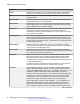
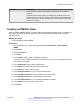
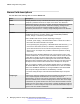
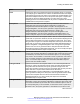
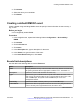
Table Of Contents
- Contents
- Chapter 1: Introduction
- Chapter 2: New in this release
- Chapter 3: Fault management fundamentals
- Chapter 4: Key Health Indicators using ACLI
- Chapter 5: Key Health Indicators using EDM
- Chapter 6: Link state change control using ACLI
- Chapter 7: Link state change control using EDM
- Chapter 8: RMON configuration using ACLI
- Chapter 9: RMON configuration using EDM
- Enabling RMON globally
- Enabling RMON on a port or VLAN
- Enabling RMON1 history
- Disabling RMON1 history
- Viewing RMON1 history statistics
- Creating an RMON1 alarm
- Creating an RMON1 port history alarm
- Viewing RMON1 alarms
- Deleting an RMON1 alarm
- Creating a default RMON1 event
- Creating a nondefault RMON1 event
- Viewing RMON1 events
- Viewing the RMON log
- Deleting an event
- Viewing the protocol directory
- Viewing the data source for protocol distribution statistics
- Viewing protocol distribution statistics
- Viewing the host interfaces enabled for monitoring
- Viewing address mappings
- Viewing the data source for host statistics
- Viewing network host statistics
- Viewing application host statistics
- Chapter 10: Viewing statistics using ACLI
- Chapter 11: Viewing statistics using EDM
- Chapter 12: Log and trap fundamentals
- Chapter 13: Log configuration using ACLI
- Chapter 14: Log configuration using EDM
- Chapter 15: SNMP trap configuration using ACLI
- Chapter 16: SNMP trap configuration using EDM
- Chapter 17: RMON alarm variables
- Glossary

Name Description
Owner Specifies the entity that configured this entry and is therefore using the assigned
resources. If this object contains a string starting with monitor and has
associated entries in the log table, all connected management stations retrieve
those log entries, as they have significance to all management stations
connected to this device.
Creating a nondefault RMON1 event
Create a custom rising and falling RMON1 event to specify if alarm information is sent to a trap, a
log, or both.
Procedure
1. In the navigation tree, expand the following folders: Configuration > Serviceability >
RMON.
2. Click Alarms.
3. Click the Events tab.
4. Click Insert.
5. In the Description box, type an event name.
6. In the Type option, select an event type.
The default configuration is log-and-trap. To save memory, configure the event type to log.
To reduce traffic from the system, configure the event type to snmp-log.
If you select snmp-trap or log, you must configure trap receivers.
7. In the Community box, type an SNMP community.
8. In the Owner box, type the owner of this event.
9. Click Insert.
Events field descriptions
Use the data in the following table to use the Events tab.
Name
Description
Index Uniquely identifies an entry in the event table. Each entry defines one event that
the system generates after the appropriate conditions occur. The default is 1.
Description Specifies a comment that describes this event entry.
Table continues…
RMON configuration using EDM
58 Managing Faults on Avaya VSP 7200 Series and 8000 Series June 2015
Comments on this document? infodev@avaya.com