
Managing Faults on Avaya Virtual Services Platform 7200 Series and 8000 Series Version 4.2.1
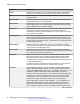
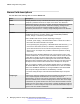
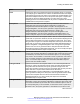
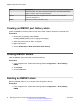
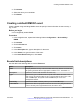
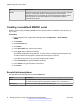
Table Of Contents
- Contents
- Chapter 1: Introduction
- Chapter 2: New in this release
- Chapter 3: Fault management fundamentals
- Chapter 4: Key Health Indicators using ACLI
- Chapter 5: Key Health Indicators using EDM
- Chapter 6: Link state change control using ACLI
- Chapter 7: Link state change control using EDM
- Chapter 8: RMON configuration using ACLI
- Chapter 9: RMON configuration using EDM
- Enabling RMON globally
- Enabling RMON on a port or VLAN
- Enabling RMON1 history
- Disabling RMON1 history
- Viewing RMON1 history statistics
- Creating an RMON1 alarm
- Creating an RMON1 port history alarm
- Viewing RMON1 alarms
- Deleting an RMON1 alarm
- Creating a default RMON1 event
- Creating a nondefault RMON1 event
- Viewing RMON1 events
- Viewing the RMON log
- Deleting an event
- Viewing the protocol directory
- Viewing the data source for protocol distribution statistics
- Viewing protocol distribution statistics
- Viewing the host interfaces enabled for monitoring
- Viewing address mappings
- Viewing the data source for host statistics
- Viewing network host statistics
- Viewing application host statistics
- Chapter 10: Viewing statistics using ACLI
- Chapter 11: Viewing statistics using EDM
- Chapter 12: Log and trap fundamentals
- Chapter 13: Log configuration using ACLI
- Chapter 14: Log configuration using EDM
- Chapter 15: SNMP trap configuration using ACLI
- Chapter 16: SNMP trap configuration using EDM
- Chapter 17: RMON alarm variables
- Glossary

Name Description
Value Specifies the value of the statistic during the last sampling period. For example,
if the sample type is deltaValue, this value is the difference between the samples
at the beginning and end of the period. If the sample type is absoluteValue, this
value is the sampled value at the end of the period. This system compares the
value with the rising and falling thresholds. The value during the current
sampling period is not made available until the period is completed and remains
available until the next period is complete.
StartUpAlarm Specifies the alarm that is sent after this entry is first set to valid. If the first
sample after this entry becomes valid is greater than or equal to the
risingThreshold and alarmStartupAlarm is equal to the risingAlarm or the
risingOrFallingAlarm, then the system generates a single rising alarm. If the first
sample after this entry becomes valid is less than or equal to the
fallingThreshold and alarmStartupAlarm is equal to the fallingAlarm or the
risingOrFallingAlarm, then the system generates a single falling alarm. You
cannot modify this object if the associated alarmStatus object is equal to valid.
RisingThreshold Specifies a threshold for the sampled statistic. After the current sampled value is
greater than or equal to this threshold, and the value at the last sampling interval
was less than this threshold, the system generates a single event. The system
also generates a single event if the first sample after this entry becomes valid is
greater than or equal to this threshold and the associated alarmStartupAlarm is
equal to risingAlarm or risingOrFallingAlarm. After a rising event is generated,
another such event is not generated until the sampled value falls below this
threshold and reaches the alarmFallingThreshold. You cannot modify this object
if the associated alarmStatus object is equal to valid.
RisingEventIndex Specifies the index of the eventEntry that is used after a rising threshold is
crossed. The eventEntry identified by a particular value of this index is the same
as identified by the same value of the eventIndex object. If no corresponding
entry exists in the eventTable, no association exists. In particular, if this value is
zero, the system generates no associated event, as zero is not a valid event
index. You cannot modify this object if the associated alarmStatus object is
equal to valid. The default is 60534.
FallingThreshold Specifies a threshold for the sampled statistic. If the current sampled value is
less than or equal to this threshold, and the value at the last sampling interval
was greater than this threshold, the system generates a single event. The
system also generates a single event if the first sample after this entry becomes
valid is less than or equal to this threshold and the associated
alarmStartupAlarm is equal to fallingAlarm or risingOrFallingAlarm. After the
system generates a falling event, the system does not generate another similar
event until the sampled value rises above this threshold and reaches the
alarmRisingThreshold. You cannot modify this object if the associated
alarmStatus object is equal to valid.
FallingEventIndex Specifies the index of the eventEntry that the system uses after a falling
threshold is crossed. The eventEntry identified by a particular value of this index
is the same as identified by the same value of the eventIndex object. If there is
no corresponding entry in the eventTable, no association exists. In particular, if
this value is zero, the system generates no associated event, as zero is not a
Table continues…
Creating an RMON1 alarm
June 2015 Managing Faults on Avaya VSP 7200 Series and 8000 Series 55
Comments on this document? infodev@avaya.com