
Managing Faults on Avaya Virtual Services Platform 7200 Series and 8000 Series Version 4.2.1
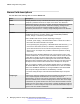
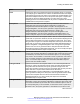
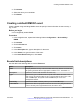
Table Of Contents
- Contents
- Chapter 1: Introduction
- Chapter 2: New in this release
- Chapter 3: Fault management fundamentals
- Chapter 4: Key Health Indicators using ACLI
- Chapter 5: Key Health Indicators using EDM
- Chapter 6: Link state change control using ACLI
- Chapter 7: Link state change control using EDM
- Chapter 8: RMON configuration using ACLI
- Chapter 9: RMON configuration using EDM
- Enabling RMON globally
- Enabling RMON on a port or VLAN
- Enabling RMON1 history
- Disabling RMON1 history
- Viewing RMON1 history statistics
- Creating an RMON1 alarm
- Creating an RMON1 port history alarm
- Viewing RMON1 alarms
- Deleting an RMON1 alarm
- Creating a default RMON1 event
- Creating a nondefault RMON1 event
- Viewing RMON1 events
- Viewing the RMON log
- Deleting an event
- Viewing the protocol directory
- Viewing the data source for protocol distribution statistics
- Viewing protocol distribution statistics
- Viewing the host interfaces enabled for monitoring
- Viewing address mappings
- Viewing the data source for host statistics
- Viewing network host statistics
- Viewing application host statistics
- Chapter 10: Viewing statistics using ACLI
- Chapter 11: Viewing statistics using EDM
- Chapter 12: Log and trap fundamentals
- Chapter 13: Log configuration using ACLI
- Chapter 14: Log configuration using EDM
- Chapter 15: SNMP trap configuration using ACLI
- Chapter 16: SNMP trap configuration using EDM
- Chapter 17: RMON alarm variables
- Glossary

Parameter Description
probes placed on a station and a repeater can report the same number of
collisions.
An RMON probe inside a repeater can ideally report collisions between the
repeater and one or more other hosts (transmit collisions as defined by IEEE
802.3k) plus receiver collisions observed on any coax segments to which the
repeater is connected.
Creating an RMON1 alarm
After you enable RMON1 globally, you also create a default rising and falling event. The default for
the events is log-and-trap, which means that you receive notification through a trap as well as
through a log file.
Before you begin
• You must globally enable RMON.
Procedure
1. In the navigation tree, expand the following folders: Configuration > Serviceability >
RMON.
2. Click Alarms.
3. Click the Alarms tab.
4. Click Insert.
5. In the Variable option, select a variable for the alarm.
If you select some variables, the system will prompt you for a port (or other object) on which
you want to set an alarm.
6. In the SampleType option, select a sample type.
7. In the Interval box, type a sample interval in seconds.
8. In the Index box, type an index number.
9. In the RisingThreshold box, type a rising threshold value.
10. In the RisingEventIndex box, type a rising threshold event index.
11. In the FallingThreshold box, type a falling threshold value.
12. In the FallingEventIndex box, type a falling threshold event index.
13. In the Owner box, type the owner of the alarm.
14. Click Insert.
Creating an RMON1 alarm
June 2015 Managing Faults on Avaya VSP 7200 Series and 8000 Series 53
Comments on this document? infodev@avaya.com