
Managing Faults on Avaya Virtual Services Platform 7200 Series and 8000 Series Version 4.2.1
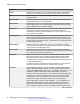
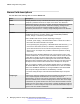
Table Of Contents
- Contents
- Chapter 1: Introduction
- Chapter 2: New in this release
- Chapter 3: Fault management fundamentals
- Chapter 4: Key Health Indicators using ACLI
- Chapter 5: Key Health Indicators using EDM
- Chapter 6: Link state change control using ACLI
- Chapter 7: Link state change control using EDM
- Chapter 8: RMON configuration using ACLI
- Chapter 9: RMON configuration using EDM
- Enabling RMON globally
- Enabling RMON on a port or VLAN
- Enabling RMON1 history
- Disabling RMON1 history
- Viewing RMON1 history statistics
- Creating an RMON1 alarm
- Creating an RMON1 port history alarm
- Viewing RMON1 alarms
- Deleting an RMON1 alarm
- Creating a default RMON1 event
- Creating a nondefault RMON1 event
- Viewing RMON1 events
- Viewing the RMON log
- Deleting an event
- Viewing the protocol directory
- Viewing the data source for protocol distribution statistics
- Viewing protocol distribution statistics
- Viewing the host interfaces enabled for monitoring
- Viewing address mappings
- Viewing the data source for host statistics
- Viewing network host statistics
- Viewing application host statistics
- Chapter 10: Viewing statistics using ACLI
- Chapter 11: Viewing statistics using EDM
- Chapter 12: Log and trap fundamentals
- Chapter 13: Log configuration using ACLI
- Chapter 14: Log configuration using EDM
- Chapter 15: SNMP trap configuration using ACLI
- Chapter 16: SNMP trap configuration using EDM
- Chapter 17: RMON alarm variables
- Glossary

Parameter Description
Octets Specifies the total number of octets of data (including those in bad packets)
received on the network (excluding framing bits but including FCS octets)
Pkts Specifies the number of packets (including bad packets) received during this
sampling interval.
BroadcastPkts Specifies the number of good packets received during this sampling interval
that were directed to the broadcast address.
MulticastPkts Specifies the number of good packets received during this sampling interval
that the system directs to a multicast address. This number does not include
packets addressed to the broadcast address.
DropEvents Specifies the total number of events in which the probe dropped packets due
to lack of resources during this sampling interval. This number is not
necessarily the number of packets dropped; it is only the number of times the
system detects this condition.
CRCAlignErrors The number of packets the system receives during this sampling interval that
had a length (excluding framing bits but including FCS octets) from 64–1518
octets, inclusive, but had either a bad Frame Check Sequence (FCS) with an
integral number of octets (FCS Error) or a bad FCS with a nonintegral number
of octets (Alignment Error).
UndersizePkts Specifies the number of packets the system receives during this sampling
interval that were less than 64 octets (excluding framing bits but including FCS
octets), and were otherwise well formed.
OversizePkts Specifies the number of packets the system receives during this sampling
interval that were longer than 1518 octets (excluding framing bits but including
FCS octets), but were otherwise well formed.
Fragments Specifies the total number of packets received during this sampling interval
that were less than 64 octets in length (excluding framing bits but including
FCS octets) and had either a bad Frame Check Sequence (FCS) with an
integral number of octets (FCS Error) or a bad FCS with a nonintegral number
of octets (Alignment Error).
It is entirely normal for Fragments to increment because it counts both runts
(which are normal occurrences due to collisions) and noise hits.
Collisions Specifies the best estimate of the total number of collisions on this Ethernet
segment during this sampling interval. The value returned depends on the
location of the RMON probe. Section 8.2.1.3 (10BASE-5) and section 10.3.1.3
(10BASE-2) of IEEE standard 802.3 states that a station must detect a
collision in the receive mode if three or more stations transmit simultaneously.
A repeater port must detect a collision when two or more stations transmit
simultaneously. Thus, a probe placed on a repeater port can record more
collisions than a probe connected to a station on the same segment.
Probe location plays a small role when 10BASE-T. 14.2.1.4 (10BASE-T) of
IEEE standard 802.3 defines a collision as the simultaneous presence of
signals on the DO and RD circuits (transmitting and receiving at the same
time). A 10BASE-T station can detect only collisions when it transmits. Thus,
Table continues…
RMON configuration using EDM
52 Managing Faults on Avaya VSP 7200 Series and 8000 Series June 2015
Comments on this document? infodev@avaya.com