
Managing Faults on Avaya Virtual Services Platform 7200 Series and 8000 Series Version 4.2.1
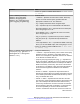
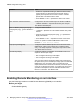
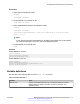
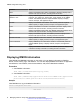
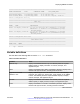
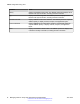
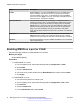
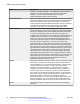
Table Of Contents
- Contents
- Chapter 1: Introduction
- Chapter 2: New in this release
- Chapter 3: Fault management fundamentals
- Chapter 4: Key Health Indicators using ACLI
- Chapter 5: Key Health Indicators using EDM
- Chapter 6: Link state change control using ACLI
- Chapter 7: Link state change control using EDM
- Chapter 8: RMON configuration using ACLI
- Chapter 9: RMON configuration using EDM
- Enabling RMON globally
- Enabling RMON on a port or VLAN
- Enabling RMON1 history
- Disabling RMON1 history
- Viewing RMON1 history statistics
- Creating an RMON1 alarm
- Creating an RMON1 port history alarm
- Viewing RMON1 alarms
- Deleting an RMON1 alarm
- Creating a default RMON1 event
- Creating a nondefault RMON1 event
- Viewing RMON1 events
- Viewing the RMON log
- Deleting an event
- Viewing the protocol directory
- Viewing the data source for protocol distribution statistics
- Viewing protocol distribution statistics
- Viewing the host interfaces enabled for monitoring
- Viewing address mappings
- Viewing the data source for host statistics
- Viewing network host statistics
- Viewing application host statistics
- Chapter 10: Viewing statistics using ACLI
- Chapter 11: Viewing statistics using EDM
- Chapter 12: Log and trap fundamentals
- Chapter 13: Log configuration using ACLI
- Chapter 14: Log configuration using EDM
- Chapter 15: SNMP trap configuration using ACLI
- Chapter 16: SNMP trap configuration using EDM
- Chapter 17: RMON alarm variables
- Glossary

f. Click Apply.
Enabling RMON1 history
About this task
Use RMON1 to establish a history for a port and configure the bucket interval. For example, to
gather RMON statistics over the weekend, you must have enough buckets to cover two days.
Configure the history to gather one bucket every hour, and cover a 48-hour period. After you
configure the history characteristics, you cannot modify them; you must delete the history and create
another one.
Procedure
1. In the navigation tree, expand the following folders: Configuration > Serviceability >
RMON.
2. Click Control.
3. In the History tab, click Insert.
4. In the Port box, click the ellipsis (...) button.
5. Select a port.
6. Click OK.
7. In the Buckets Requested box, type the number of discrete time intervals to save data.
8. In the Interval box, type the interval in seconds.
9. In the Owner box, type the owner information.
10. Click Insert.
History field descriptions
Use the data in the following table to use the History tab.
Name
Description
Index Specifies an index that uniquely identifies an entry in the historyControl
table. Each entry defines a set of samples at a particular interval for an
interface on the device. Index value ranges from 1–65535. The default
value is 1.
Port Identifies the source for which the system collects and places historical
data in a media-specific table on behalf of this historyControlEntry. The
source is an interface on this device. To identify a particular interface,
the object identifies the instance of the ifIndex object, defined in (4,6), for
the desired interface. For example, if an entry receives data from
Table continues…
Enabling RMON1 history
June 2015 Managing Faults on Avaya VSP 7200 Series and 8000 Series 49
Comments on this document? infodev@avaya.com