
Managing Faults on Avaya Virtual Services Platform 7200 Series and 8000 Series Version 4.2.1
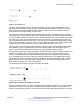
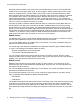
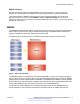
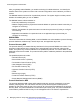
Table Of Contents
- Contents
- Chapter 1: Introduction
- Chapter 2: New in this release
- Chapter 3: Fault management fundamentals
- Chapter 4: Key Health Indicators using ACLI
- Chapter 5: Key Health Indicators using EDM
- Chapter 6: Link state change control using ACLI
- Chapter 7: Link state change control using EDM
- Chapter 8: RMON configuration using ACLI
- Chapter 9: RMON configuration using EDM
- Enabling RMON globally
- Enabling RMON on a port or VLAN
- Enabling RMON1 history
- Disabling RMON1 history
- Viewing RMON1 history statistics
- Creating an RMON1 alarm
- Creating an RMON1 port history alarm
- Viewing RMON1 alarms
- Deleting an RMON1 alarm
- Creating a default RMON1 event
- Creating a nondefault RMON1 event
- Viewing RMON1 events
- Viewing the RMON log
- Deleting an event
- Viewing the protocol directory
- Viewing the data source for protocol distribution statistics
- Viewing protocol distribution statistics
- Viewing the host interfaces enabled for monitoring
- Viewing address mappings
- Viewing the data source for host statistics
- Viewing network host statistics
- Viewing application host statistics
- Chapter 10: Viewing statistics using ACLI
- Chapter 11: Viewing statistics using EDM
- Chapter 12: Log and trap fundamentals
- Chapter 13: Log configuration using ACLI
- Chapter 14: Log configuration using EDM
- Chapter 15: SNMP trap configuration using ACLI
- Chapter 16: SNMP trap configuration using EDM
- Chapter 17: RMON alarm variables
- Glossary

Figure 1: How alarms fire
The alarm fires during the first interval that the sample goes out of range. No additional events
generate for that threshold until the system crosses the opposite threshold. Therefore, you must
carefully define the rising and falling threshold values for alarms. Incorrect thresholds cause an
alarm to fire at every alarm interval, or never at all.
You can define one threshold value to an expected, baseline value, and then define the opposite
threshold as the out-of-bounds limit. Because of sample averaging, the value is equal to ±1 baseline
unit. For example, assume you define an alarm with octets leaving a port as the variable. The intent
of the alarm is to notify you if excessive traffic occurs on that port. You enable spanning tree, and
then 52 octets transmit from the port every 2 seconds, which is equivalent to baseline traffic of 260
octets every 10 seconds. This alarm notifies you if you define the lower limit of exiting octets at 260
and you define the upper limit at 320 (or at any value greater than 260 + 52 = 312).
The rising alarm fires the first time outbound traffic, other than spanning tree Bridge Protocol Data
Units (BPDUs), occurs. The falling alarm fires after outbound traffic, other than spanning tree,
ceases. This process provides the time intervals of any nonbaseline outbound traffic.
If you define the alarm with a falling threshold of less than 260 and the alarm polling interval is at 10
seconds, for example, 250, then the rising alarm can fire only once, as shown in the following
example. The falling alarm (the opposite threshold) must fire for the rising alarm to fire a second
time. The falling alarm cannot fire unless the port becomes inactive or you disable spanning tree,
which causes the value for outbound octets to drop to zero, because the baseline traffic is always
greater than the value of the falling threshold. By definition, the failure of the falling alarm to fire
prevents the rising alarm from firing a second time.
The following figure shows an example of the alarm threshold:
Figure 2: Alarm example, threshold less than 260
When you create an alarm, you select a variable from the variable list and a port, or another system
component to which it connects. Some variables require port IDs, card IDs, or other indexes, for
example, spanning tree group IDs. You then select a rising and a falling threshold value. The rising
Remote Monitoring (RMON)
June 2015 Managing Faults on Avaya VSP 7200 Series and 8000 Series 17
Comments on this document? infodev@avaya.com