
Managing Faults on Avaya Virtual Services Platform 7200 Series and 8000 Series Version 4.2.1
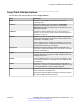
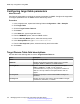
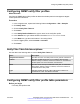
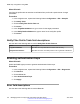
Table Of Contents
- Contents
- Chapter 1: Introduction
- Chapter 2: New in this release
- Chapter 3: Fault management fundamentals
- Chapter 4: Key Health Indicators using ACLI
- Chapter 5: Key Health Indicators using EDM
- Chapter 6: Link state change control using ACLI
- Chapter 7: Link state change control using EDM
- Chapter 8: RMON configuration using ACLI
- Chapter 9: RMON configuration using EDM
- Enabling RMON globally
- Enabling RMON on a port or VLAN
- Enabling RMON1 history
- Disabling RMON1 history
- Viewing RMON1 history statistics
- Creating an RMON1 alarm
- Creating an RMON1 port history alarm
- Viewing RMON1 alarms
- Deleting an RMON1 alarm
- Creating a default RMON1 event
- Creating a nondefault RMON1 event
- Viewing RMON1 events
- Viewing the RMON log
- Deleting an event
- Viewing the protocol directory
- Viewing the data source for protocol distribution statistics
- Viewing protocol distribution statistics
- Viewing the host interfaces enabled for monitoring
- Viewing address mappings
- Viewing the data source for host statistics
- Viewing network host statistics
- Viewing application host statistics
- Chapter 10: Viewing statistics using ACLI
- Chapter 11: Viewing statistics using EDM
- Chapter 12: Log and trap fundamentals
- Chapter 13: Log configuration using ACLI
- Chapter 14: Log configuration using EDM
- Chapter 15: SNMP trap configuration using ACLI
- Chapter 16: SNMP trap configuration using EDM
- Chapter 17: RMON alarm variables
- Glossary

Target Table field descriptions
Use the data in the following table to use the Target Table tab.
Name Description
Name Specifies a unique identifier for this table. The name is a
community string.
TDomain Specifies the transport type of the address. ipv4Tdomain
specifies the transport type of address is an IPv4 address.
ipv6Tdomain specifies the transport type of address is IPv6. The
default is ipv4Tdomain.
TAddress Specifies the transport address in xx.xx.xx.xx:port format, for
example: 10:10:10:10:162, where 162 is the trap listening port on
the system 10.10.10.10.
Timeout Specifies the maximum round trip time required to communicate
with the transport address. The value is in 1/100 seconds from 0–
2147483647. The default is 1500.
After the system sends a message to this address, if a response
(if one is expected) is not received within this time period, you can
assume that the response is not delivered.
RetryCount Specifies the maximum number of retries if a response is not
received for a generated message. The count can be in the range
of 0–255. The default is 3.
TagList Contains a list of tag values used to select target addresses for a
particular operation. A tag refers to a class of targets to which the
messages can be sent.
Params Contains SNMP parameters used to generate messages to send
to this transport address. For example, to receive SNMPv2C traps,
use TparamV2.
TMask Specifies the mask. The value can be empty or in six-byte hex
string format. Tmask is an optional parameter that permits an entry
in the TargetAddrTable to specify multiple addresses.
MMS Specifies the maximum message size. The size can be zero, or
484–2147483647. The default is 484.
Although the maximum MMS is 2147483647, the device supports
the maximum SNMP packet size of 8192.
Configuring an SNMP host target address
June 2015 Managing Faults on Avaya VSP 7200 Series and 8000 Series 105
Comments on this document? infodev@avaya.com