
Managing Faults on Avaya Virtual Services Platform 7200 Series and 8000 Series Version 4.2.1
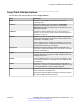
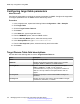
Table Of Contents
- Contents
- Chapter 1: Introduction
- Chapter 2: New in this release
- Chapter 3: Fault management fundamentals
- Chapter 4: Key Health Indicators using ACLI
- Chapter 5: Key Health Indicators using EDM
- Chapter 6: Link state change control using ACLI
- Chapter 7: Link state change control using EDM
- Chapter 8: RMON configuration using ACLI
- Chapter 9: RMON configuration using EDM
- Enabling RMON globally
- Enabling RMON on a port or VLAN
- Enabling RMON1 history
- Disabling RMON1 history
- Viewing RMON1 history statistics
- Creating an RMON1 alarm
- Creating an RMON1 port history alarm
- Viewing RMON1 alarms
- Deleting an RMON1 alarm
- Creating a default RMON1 event
- Creating a nondefault RMON1 event
- Viewing RMON1 events
- Viewing the RMON log
- Deleting an event
- Viewing the protocol directory
- Viewing the data source for protocol distribution statistics
- Viewing protocol distribution statistics
- Viewing the host interfaces enabled for monitoring
- Viewing address mappings
- Viewing the data source for host statistics
- Viewing network host statistics
- Viewing application host statistics
- Chapter 10: Viewing statistics using ACLI
- Chapter 11: Viewing statistics using EDM
- Chapter 12: Log and trap fundamentals
- Chapter 13: Log configuration using ACLI
- Chapter 14: Log configuration using EDM
- Chapter 15: SNMP trap configuration using ACLI
- Chapter 16: SNMP trap configuration using EDM
- Chapter 17: RMON alarm variables
- Glossary

Configuring SNMP interfaces
Configure an interface to send SNMP traps. If the switch has multiple interfaces, configure the IP
interface from which the SNMP traps originate.
Procedure
1. Enter Global Configuration mode:
enable
configure terminal
2. Configure the destination and source IP addresses for SNMP traps:
snmp-server sender-ip {A.B.C.D} {A.B.C.D}
3. If required, send the source address (sender IP) as the sender network in the notification
message:
snmp-server force-trap-sender enable
4. If required, force the SNMP and IP sender flag to use the same value:
snmp-server force-iphdr-sender enable
Example
Switch(config)# snmp-server sender-ip 172.16.120.2 172.16.120.5
Switch(config)# no snmp-server force-iphdr-sender enable
Variable definitions
Use the data in the following table to use the snmp-server command.
Table 20: Variable definitions
Variable Value
agent-conformance enable Enables the agent conformance mode. Conforms to MIB
standards if disabled. If you activate this option, feature
configuration is stricter and error handling less informative.
Avaya recommends that you do not activate this option; it is not
a normally supported mode of operation.
authentication-trap enable Activates the generation of authentication traps.
force-iphdr-sender enable Automatically configures the SNMP and IP sender to the same
value. The default is disabled.
force-trap-sender enable Sends the configured source address (sender IP) as the sender
network in the notification message.
Table continues…
Configuring SNMP interfaces
June 2015 Managing Faults on Avaya VSP 7200 Series and 8000 Series 101
Comments on this document? infodev@avaya.com