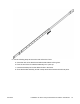
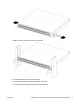
3. Slide the switch onto a shelf or tray in the rack.
4. Insert and tighten the rack-mount screws.
5. Verify that the switch is securely fastened to the rack.
6. Connect power and network connections to the switch.
June 2015 Installation Job Aid for Avaya Virtual Services Platform 7200 Series 34