
Performance Management on Virtual Services Platform 4000 Series Version 5.1.2
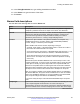
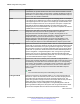
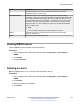
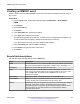
Table Of Contents
- Contents
- Chapter 1: Introduction
- Chapter 2: New in this document
- Chapter 3: Performance management fundamentals
- Chapter 4: Chassis performance management using EDM
- Chapter 5: Port performance management using ACLI
- Chapter 6: Port performance management using EDM
- Chapter 7: Statistics
- Viewing statistics using ACLI
- Viewing TCP statistics
- Viewing port routing statistics
- Displaying bridging statistics for specific ports
- Displaying DHCP-relay statistics for specific ports
- Displaying DHCP-relay statistics for all interfaces
- Viewing IPv6 DHCP Relay statistics
- Displaying LACP statistics for specific ports
- Displaying RMON statistics for specific ports
- Displaying detailed statistics for ports
- Displaying IS-IS statistics and counters
- Clearing ACL statistics
- Viewing ACE statistics
- Viewing MSTP statistics
- Viewing RSTP statistics
- Viewing RSTP port statistics
- Viewing MLT statistics
- Viewing vIST statistics
- Viewing IPv6 OSPF statistics
- Showing the EAPoL status of the device
- Showing EAPoL authenticator statistics
- Viewing EAPoL session statistics
- Viewing non-EAPoL MAC information
- Viewing port EAPoL operation statistics
- Showing RADIUS server statistics
- Viewing RMON statistics
- Displaying IPsec statistics
- Displaying IPsec statistics
- Viewing ICMP statistics
- Clearing IPv6 statistics
- Viewing IPv6 VRRP statistics
- Viewing IPv6 statistics on an interface
- Viewing IP VRRPv3 statistics
- Displaying VLACP statistics for specific ports
- Viewing statistics using EDM
- Graphing chassis statistics
- Graphing port statistics
- Viewing chassis system statistics
- Viewing chassis SNMP statistics
- Viewing chassis IP statistics
- Viewing chassis ICMP In statistics
- Viewing chassis ICMP Out statistics
- Viewing ICMP statistics
- Viewing chassis TCP statistics
- Viewing chassis UDP statistics
- Viewing port interface statistics
- Viewing port Ethernet errors statistics
- Viewing port bridging statistics
- Viewing port spanning tree statistics
- Viewing port routing statistics
- Viewing IPv6 statistics for an interface
- Viewing DHCP statistics for an interface
- Graphing DHCP statistics for a port
- Viewing DHCP statistics for a port
- Viewing IPv6 DHCP Relay statistics for a port
- Graphing DHCP statistics for a VLAN
- Displaying DHCP-relay statistics for Option 82
- Viewing LACP port statistics
- Viewing port policer statistics
- Displaying file statistics
- Viewing ACE port statistics
- Viewing ACL statistics
- Clearing ACL statistics
- Viewing VLAN and Spanning Tree CIST statistics
- Viewing VLAN and Spanning Tree MSTI statistics
- Viewing VRRP interface stats
- Viewing VRRP statistics
- Viewing SMLT statistics
- Viewing IPv6 VRRP statistics for an interface
- Viewing IPv6 VRRP statistics
- Viewing IP VRRPv3 statistics
- Viewing RSTP status statistics
- Viewing MLT interface statistics
- Viewing MLT Ethernet error statistics
- Viewing IPv6 OSPF statistics
- Displaying IPsec interface statistics
- Displaying switch level statistics for IPsec-enabled interfaces
- Viewing BGP global stats
- Viewing statistics for a VRF
- Viewing EAPoL Authenticator statistics
- Viewing EAPoL session statistics
- Viewing non-EAPoL MAC information
- Viewing Multihost status information
- Showing RADIUS server statistics
- Showing SNMP statistics
- Enabling RMON statistics
- Viewing RMON statistics
- Displaying IS-IS system statistics
- Displaying IS-IS interface counters
- Displaying IS-IS interface control packets
- Graphing IS-IS interface counters
- Graphing IS-IS interface sending control packet statistics
- Graphing IS-IS interface receiving control packet statistics
- Viewing statistics using ACLI
- Chapter 8: RMON configuration using ACLI
- Chapter 9: RMON configuration using EDM
- Enabling RMON globally
- Enabling RMON on a port or VLAN
- Enabling RMON1 history
- Disabling RMON1 history
- Viewing RMON1 history statistics
- Creating an RMON1 alarm
- Viewing RMON alarms
- Deleting an alarm
- Creating an RMON1 event
- Viewing RMON1 events
- Deleting an event
- Viewing the RMON log
- Viewing the protocol directory
- Viewing the data source for protocol distribution statistics
- Viewing protocol distribution statistics
- Viewing the host interfaces enabled for monitoring
- Viewing address mappings
- Viewing the data source for host statistics
- Viewing network host statistics
- Viewing application host statistics
- Chapter 10: Service Level Agreement Monitor
- Chapter 11: MACsec performance
- Chapter 12: RMON alarm variables

12. In the FallingEventIndex box, type a falling threshold event index.
13. In the Owner box, type the owner of the alarm.
14. Click Insert.
Alarms field descriptions
Use the data in the following table to use the Alarms tab.
Name Description
Index Uniquely identifies an entry in the alarm table. Each entry defines a diagnostic
sample at a particular interval for an object on the device. The default is 1.
Interval Specifies the interval, in seconds, over which the data is sampled and compared
with the rising and falling thresholds. deltaValue sampling—Configures the
interval short enough that the sampled variable is unlikely to increase or
decrease by more than 2^31–1 during a single sampling interval.
Variable Specifies the object identifier of the particular variable to be sampled. Only
variables that resolve to an ASN.1 primitive type of INTEGER (INTEGER,
Counter, Gauge, or TimeTicks) can be sampled.
Alarm variables exist in three formats, depending on the type:
• A chassis, power supply, or fan-related alarm ends in x where the x index is
hard-coded. No further information is required.
• A card, spanning tree group (STG), or EtherStat alarm ends with a dot (.). You
must enter a card number, STG ID, IP address, or EtherStat information.
• A port alarm ends with no dot or index and requires that you use the port
shortcut menu. An example of a port alarm is ifInOctets (interface incoming
octet count).
Because the system articulates SNMP access control entirely in terms of the
contents of MIB views, no access control mechanism exists to restrict the value
of this object to identify only those objects that exist in a particular MIB view.
Because no acceptable means of restricting the read access that is obtained
through the alarm mechanism exists, the probe must grant only write access to
this object in those views that have read access to all objects on the probe.
After you configure a variable, if the supplied variable name is not available in
the selected MIB view, the system returns a badValue error. After the variable
name of an established alarmEntry is no longer available in the selected MIB
view, the probe changes the status of this alarmEntry to invalid.
You cannot modify this object if the associated alarmStatus object is equal to
valid.
SampleType
Specifies the method of sampling the selected variable and calculating the value
to be compared against the thresholds. If the value of this object is
absoluteValue, the value of the system compares the selected variable directly
with the thresholds at the end of the sampling interval. If the value of this object
Table continues…
Creating an RMON1 alarm
January 2017 Performance Management on Avaya VSP 4000 Series 171
Comments on this document? infodev@avaya.com