
Installation Instructions


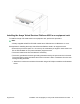


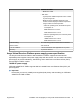

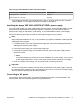
Table Of Contents
- Installation Job Aid (English) for Avaya VSP 4000 4450GTX-HT-PWR+
- How to get help
- Notices
- Safety messages
- Location restrictions
- Before you begin
- Installing the VSP 4000 4450GTX-HT-PWR+
- Installing the Avaya Virtual Services Platform 4000 on a table or shelf
- Installing the Avaya Virtual Services Platform 4000 in an equipment rack
- Installing SFP transceivers
- Removing SFP transceivers
- Power specifications for Avaya VSP 4000 switch 4450GTX-HT-PWR+
- Avaya Virtual Services Platform power supply power specification
- Installing the Avaya VSP 4000 4450GTX-HT-PWR+ power supply
- Connecting to AC power

Figure 1: 1000W AC power supply
Connector
The 1000W AC power supply uses an IEC 60320 C16 AC power cord connector. The AC power
cord is in close proximity to the hot air exhaust, and supports high operating temperatures.
Figure 2: IEC 60320 C16 connector
Power over Ethernet Plus specifications
Table 2: Avaya VSP 4450GTX-HT-PWR+ model
0°C to 50°C
50°C to 70°C
1 PSU 860W 400W
2 PSU 1660W 832W
Table 3: Avaya VSP 4450GTX-HT-PWR+ model with 1 PSU
0°C to 50°C
50°C to 70°C
PoE support on 48 ports 23 ports
PoE+ support on 26 ports 13 ports
August 2014 Installation Job Aid (English) for Avaya VSP 4000 4450GTX-HT-PWR+ 9