
Installation Instructions


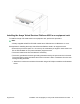


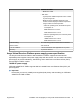

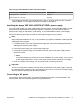

Table Of Contents
- Installation Job Aid (English) for Avaya VSP 4000 4450GTX-HT-PWR+
- How to get help
- Notices
- Safety messages
- Location restrictions
- Before you begin
- Installing the VSP 4000 4450GTX-HT-PWR+
- Installing the Avaya Virtual Services Platform 4000 on a table or shelf
- Installing the Avaya Virtual Services Platform 4000 in an equipment rack
- Installing SFP transceivers
- Removing SFP transceivers
- Power specifications for Avaya VSP 4000 switch 4450GTX-HT-PWR+
- Avaya Virtual Services Platform power supply power specification
- Installing the Avaya VSP 4000 4450GTX-HT-PWR+ power supply
- Connecting to AC power

Table 5: International power cord specifications
Country and Plug Specification Specifications Typical Plug
Continental Europe:
• CEE7 standard VII male plug
• Harmonized cord (HAR marking on the outside of the cord
jacket to comply with the CENELEC Harmonized
Document HD-21)
• 220 or 230VAC
• 50 Hz
• Single phase
United States of America, Canada, and Japan:
• NEMA5-15P male plug
• UL-recognized (UL stamped on cord jacket)
• CSA-certified (CSA label secured to the cord)
• 100 or 120VAC
• 50–60 Hz
• Single phase
United Kingdom:
• BS1363 male plug with fuse
• Harmonized cord
• 240VAC
• 50 Hz
• Single phase
Australia:
• AS3112-1981 male plug
• 240VAC
• 50 Hz
• Single phase
Danger:
Using power cords with a proper grounding path
Use only power cords that have a grounding path. Without a proper ground, a person who
touches the switch is in danger of receiving an electrical shock. Lack of a grounding path to the
switch can result in excessive emissions.
August 2014 Installation Job Aid (English) for Avaya VSP 4000 4450GTX-HT-PWR+ 11