
Installation Instructions


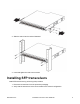


Table Of Contents
- Notices
- Safety messages
- Before you begin
- Installing the Virtual Services Platform 4000 on a table or shelf
- Installing the Virtual Services Platform 4000 in an equipment rack
- Installing SFP transceivers
- Removing SFP transceivers
- AC power supply specifications
- VSP 4000 power supply power specification
- Installing the Virtual Services Platform 4000 power supply
- Connecting to AC power

3. Slide the switch into the rack as illustrated.
4. Insert and tighten the rack-mount screws.
Installing SFP transceivers
Install SFP transceivers by performing this procedure.
1. Remove the transceiver from the protective packaging.
2. Verify that the transceiver is the correct model for the network configuration.
November 2017 Installation Job Aid for VSP 4850GTS 6