
Design Reference




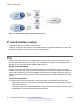
Table Of Contents
- Contents
- Chapter 1: Introduction
- Chapter 2: New in this release
- Chapter 3: Network design fundamentals
- Chapter 4: Hardware fundamentals and guidelines
- Chapter 5: Optical routing design
- Chapter 6: Platform redundancy
- Chapter 7: Link redundancy
- Chapter 8: Layer 2 loop prevention
- Chapter 9: Layer 2 switch clustering and SMLT
- Chapter 10: Layer 3 switch clustering and RSMLT
- Chapter 11: Layer 3 switch clustering and multicast SMLT
- Chapter 12: Spanning tree
- Chapter 13: Layer 3 network design
- Chapter 14: SPBM design guidelines
- Chapter 15: IP multicast network design
- Multicast and VRF-Lite
- Multicast and MultiLink Trunking considerations
- Multicast scalability design rules
- IP multicast address range restrictions
- Multicast MAC address mapping considerations
- Dynamic multicast configuration changes
- IGMPv3 backward compatibility
- IGMP Layer 2 Querier
- TTL in IP multicast packets
- Multicast MAC filtering
- Guidelines for multicast access policies
- Split-subnet and multicast
- Protocol Independent Multicast-Sparse Mode guidelines
- Protocol Independent Multicast-Source Specific Multicast guidelines
- Multicast for multimedia
- Chapter 16: System and network stability and security
- Chapter 17: QoS design guidelines
- Chapter 18: Layer 1, 2, and 3 design examples
- Glossary

The routers in example 2 use the following configuration:
• S1 has an OSPF router ID of 1.1.1.1, and the OSPF port uses an IP address of 192.168.10.1.
• S2 has an OSPF router ID of 1.1.1.2, and two OSPF ports use IP addresses of 192.168.10.2
and 192.168.20.1.
• S3 has an OSPF router ID of 1.1.1.3, and the OSPF port uses an IP address of 192.168.20.2.
The general method to configure OSPF on each routing switch is:
1. Enable OSPF globally.
2. Insert IP addresses, subnet masks, and VLAN IDs for the OSPF ports on S1 and S3, and for
the two OSPF ports on S2. The two ports on S2 enable routing and establish the IP
addresses related to the two networks.
3. Enable OSPF for each OSPF port allocated with an IP address.
After you configure all three switches for OSPF, they elect a designated router and a backup
designated router for each subnet and exchange hello packets to synchronize their link-state
databases.
The following figure shows an example where OSPF operates on two subnets in two OSPF areas.
S2 becomes the area border router for both networks.
Figure 35: Example 3: OSPF on two subnets in two areas
The routers in scenario 3 use the following configuration:
• S1 has an OSPF router ID of 1.1.1.1. The OSPF port uses an IP address of 192.168.10.1,
which is in OSPF area 1.
• S2 has an OSPF router ID of 1.1.1.2. One port uses an IP address of 192.168.10.2, which is in
OSPF area 1. The second OSPF port on S2 uses an IP address of 192.168.20.1, which is in
OSPF area 2.
• S3 has an OSPF router ID of 1.1.1.3. The OSPF port uses an IP address of 192.168.20.2,
which is in OSPF area 2.
The general method to configure OSPF for this three-switch network is:
1. On all three switches, enable OSPF globally.
Layer 3 network design
84 Network Design Reference for Avaya VSP 4000 Series June 2015
Comments on this document? infodev@avaya.com