
Design Reference




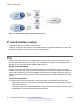
Table Of Contents
- Contents
- Chapter 1: Introduction
- Chapter 2: New in this release
- Chapter 3: Network design fundamentals
- Chapter 4: Hardware fundamentals and guidelines
- Chapter 5: Optical routing design
- Chapter 6: Platform redundancy
- Chapter 7: Link redundancy
- Chapter 8: Layer 2 loop prevention
- Chapter 9: Layer 2 switch clustering and SMLT
- Chapter 10: Layer 3 switch clustering and RSMLT
- Chapter 11: Layer 3 switch clustering and multicast SMLT
- Chapter 12: Spanning tree
- Chapter 13: Layer 3 network design
- Chapter 14: SPBM design guidelines
- Chapter 15: IP multicast network design
- Multicast and VRF-Lite
- Multicast and MultiLink Trunking considerations
- Multicast scalability design rules
- IP multicast address range restrictions
- Multicast MAC address mapping considerations
- Dynamic multicast configuration changes
- IGMPv3 backward compatibility
- IGMP Layer 2 Querier
- TTL in IP multicast packets
- Multicast MAC filtering
- Guidelines for multicast access policies
- Split-subnet and multicast
- Protocol Independent Multicast-Sparse Mode guidelines
- Protocol Independent Multicast-Source Specific Multicast guidelines
- Multicast for multimedia
- Chapter 16: System and network stability and security
- Chapter 17: QoS design guidelines
- Chapter 18: Layer 1, 2, and 3 design examples
- Glossary

• 5 adjacencies with an LSA_CNT of 200 (Area 3)
Calculate the number as follows:
3*500+10*1000+5*200=12.5K < 16K
This configuration ensures that the switch operates within accepted scalability limits.
OSPF design guidelines
Follow these additional OSPF guidelines:
• OSPF timers must be consistent across the entire network.
• Use OSPF area summarization to reduce routing table sizes.
• Use OSPF passive interfaces to reduce the number of active neighbor adjacencies.
• Use OSPF active interfaces only on intended route paths.
Configure wiring-closet subnets as OSPF passive interfaces unless they form a legitimate
routing path for other routes.
• Minimize the number of OSPF areas for each switch to avoid excessive shortest-path
calculations.
The switch executes the Djikstra algorithm for each area separately.
• Ensure that the OSPF dead interval is at least four times the OSPF hello-interval.
• Use MD5 authentication on untrusted OSPF links.
• Use stub or NSSAs as much as possible to reduce CPU overhead.
OSPF and CPU utilization
After you create an OSPF area route summary on an area border router, the summary route can
attract traffic to the area border router for which the router does not have a specific destination
route. Enabling ICMP unreachable-message generation on the switch can result in a high CPU
utilization rate.
To avoid high CPU utilization, Avaya recommends that you use a black-hole static route
configuration. The black-hole static route is a route (equal to the OSPF summary route) with a next
hop of 255.255.255.255. This configuration ensures that all traffic that does not have a specific next-
hop destination route is dropped.
OSPF network design examples
You can use OSPF routing in the core of a network. For more information, see
Layer 1, 2, and 3
design examples on page 170.
The following figure describes a simple implementation of an OSPF network: enabling OSPF on two
switches (S1 and S2) that are in the same subnet in one OSPF area.
Layer 3 network design
82 Network Design Reference for Avaya VSP 4000 Series June 2015
Comments on this document? infodev@avaya.com