
Design Reference



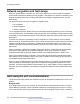


Table Of Contents
- Contents
- Chapter 1: Introduction
- Chapter 2: New in this release
- Chapter 3: Network design fundamentals
- Chapter 4: Hardware fundamentals and guidelines
- Chapter 5: Optical routing design
- Chapter 6: Platform redundancy
- Chapter 7: Link redundancy
- Chapter 8: Layer 2 loop prevention
- Chapter 9: Layer 2 switch clustering and SMLT
- Chapter 10: Layer 3 switch clustering and RSMLT
- Chapter 11: Layer 3 switch clustering and multicast SMLT
- Chapter 12: Spanning tree
- Chapter 13: Layer 3 network design
- Chapter 14: SPBM design guidelines
- Chapter 15: IP multicast network design
- Multicast and VRF-Lite
- Multicast and MultiLink Trunking considerations
- Multicast scalability design rules
- IP multicast address range restrictions
- Multicast MAC address mapping considerations
- Dynamic multicast configuration changes
- IGMPv3 backward compatibility
- IGMP Layer 2 Querier
- TTL in IP multicast packets
- Multicast MAC filtering
- Guidelines for multicast access policies
- Split-subnet and multicast
- Protocol Independent Multicast-Sparse Mode guidelines
- Protocol Independent Multicast-Source Specific Multicast guidelines
- Multicast for multimedia
- Chapter 16: System and network stability and security
- Chapter 17: QoS design guidelines
- Chapter 18: Layer 1, 2, and 3 design examples
- Glossary

Enable
DiffServ
Access
DiffServ
802.1p
Override
Routed
Packet
Tagged
Ingress
Packet
Internal
QoS
Derived
From
Egress
Packet
DSCP
Derived
from
Egress
Packet
802.1p
Derived
from
1 0, L3T=1 0, L2T=1 0 1 .1p Stays
untouched
iQoS
1 0, L3T=1 0, L2T=1 X 0 DCSP Stays
untouched
iQoS
1 1, L3T=0 0, L2T=1 X 1 .1p iQoS iQoS
1 1, L3T=0 0, L2T=1 X 0 Port QoS iQoS iQoS
0 X, L3T=0 0, L2T=1 X 1 .1p Stays
untouched
iQoS
0 X, L3T=0 0, L2T=1 X 0 Port QoS Stays
untouched
iQoS
1 0, L3T=1 1, L2T=0 X X DSCP Stays
untouched
iQoS
1 1, L3T=0 1, L2T=0 X X Port QoS iQoS iQoS
Bridged and routed traffic
In a service provider network, access nodes use VSP 4000 for bridging. In this case, VSP 4000
uses DiffServ to manage network traffic and resources, but some QoS features are unavailable in
the bridging mode of operation.
In an enterprise network, access nodes use VSP 4000 for bridging, and core nodes use it for
routing. For bridging, ingress traffic is mapped from the 802.1p-bit marking to a QoS level. For
routing, ingress traffic is mapped from the DSCP marking to the appropriate QoS level.
802.1p and 802.1Q recommendations
In a network, to map the 802.1p user priority bits, use 802.1Q-tagged encapsulation on customer-
premises equipment (CPE). You require encapsulation because VSP 4000 does not provide
classification when it operates in bridging mode.
To ensure consistent Layer 2 QoS boundaries within the service provider network, you must use
802.1Q encapsulation to connect a CPE directly to VSP 4000 access node. If you do not require
packet classification, use Avaya Ethernet Routing Switch 5600 to connect to the access node. In
this case, configure the traffic classification functions in the Avaya Ethernet Routing Switch 5600.
At the egress access node, packets are examined to determine if their IEEE 802.1p or DSCP values
must be re-marked before leaving the network. Upon examination, if the packet is a tagged packet,
the IEEE 802.1p tag is configured based on the QoS level-to-IEEE 802.1p-bit mapping. For bridged
packets, the DSCP is re-marked based on the QoS level.
QoS interface considerations
June 2015 Network Design Reference for Avaya VSP 4000 Series 165
Comments on this document? infodev@avaya.com