
Design Reference


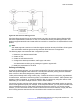



Table Of Contents
- Contents
- Chapter 1: Introduction
- Chapter 2: New in this release
- Chapter 3: Network design fundamentals
- Chapter 4: Hardware fundamentals and guidelines
- Chapter 5: Optical routing design
- Chapter 6: Platform redundancy
- Chapter 7: Link redundancy
- Chapter 8: Layer 2 loop prevention
- Chapter 9: Layer 2 switch clustering and SMLT
- Chapter 10: Layer 3 switch clustering and RSMLT
- Chapter 11: Layer 3 switch clustering and multicast SMLT
- Chapter 12: Spanning tree
- Chapter 13: Layer 3 network design
- Chapter 14: SPBM design guidelines
- Chapter 15: IP multicast network design
- Multicast and VRF-Lite
- Multicast and MultiLink Trunking considerations
- Multicast scalability design rules
- IP multicast address range restrictions
- Multicast MAC address mapping considerations
- Dynamic multicast configuration changes
- IGMPv3 backward compatibility
- IGMP Layer 2 Querier
- TTL in IP multicast packets
- Multicast MAC filtering
- Guidelines for multicast access policies
- Split-subnet and multicast
- Protocol Independent Multicast-Sparse Mode guidelines
- Protocol Independent Multicast-Source Specific Multicast guidelines
- Multicast for multimedia
- Chapter 16: System and network stability and security
- Chapter 17: QoS design guidelines
- Chapter 18: Layer 1, 2, and 3 design examples
- Glossary

Figure 80: Filter decision-making process
Configure filters through the use of Access Control Lists (ACL) and Access Control Entries (ACE),
which are implemented in hardware. An ACL can include both security and QoS type ACEs. The
platform supports 2048 ACLs and 1000 ACEs for each ACL to a maximum of 16,000 ACEs for each
plaform.
Note:
VSP 4000 supports a maximum of 256 IPv6 ingress port/vlan security ACL/Filters. IPv6 ingress
QoS ACL/Filters and IPv6 egress security and QoS ACL/Filters are not supported.
The following steps summarize the filter configuration process:
1. Determine your desired match fields.
2. Create an ACL.
3. Create an ACE within the ACL.
4. Configure the desired precedence, traffic type, and action.
You determine the traffic type by creating an ingress or egress ACL.
5. Modify the parameters for the ACE.
Policing and shaping
As part of the filtering process, you can police ingress traffic. Policing is performed according to the
traffic filter profile assigned to the traffic flow. For enterprise networks, policing ensures that traffic
flows conform to the criteria assigned by network managers.
Traffic policers identify traffic using a traffic policy. Traffic that conforms to this policy is guaranteed
for transmission, whereas nonconforming traffic is considered to be in violation. Traffic policers drop
packets if traffic is excessive, or remark the DSCP or 802.1p markings by using filter actions. With
VSP 4000, you can define multiple actions in case of traffic violation.
For service providers, policing at the network edge provides different bandwidth options as part of a
service-level agreement (SLA). For example, in an enterprise network, you can police the traffic rate
from one department to give critical traffic unlimited access to the network. In a service provider
network, you can control the amount of traffic customers send to ensure that they comply with their
SLA. Policing ensures that users do not exceed their traffic contract for a QoS level.
QoS mechanisms
June 2015 Network Design Reference for Avaya VSP 4000 Series 163
Comments on this document? infodev@avaya.com