
Installation Instructions


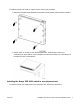


Table Of Contents
- Installation Job Aid for Avaya VSP 4000 4450GSX series
- How to get help
- Notices
- Safety messages
- Before you begin
- Installing the Avaya VSP 4450GSX series switches
- Installing the Avaya VSP 4000 switch on a table or shelf
- Installing the Avaya VSP 4000 switch in an equipment rack
- Installing SFP transceivers
- Removing SFP transceivers
- Power specifications for the Avaya VSP 4450GSX series switches
- Power supply power specifications for the VSP 4450GSX series switches
- Installing the Avaya Virtual Services Platform 4000 power supply
- Connecting to AC power
- Connecting to DC power

To install an Avaya VSP 4000 on a table or shelf, perform this procedure.
1. Attach the included rubber footpads on the bottom of the switch at the locations indicated.
2. Set the switch on a table or shelf as illustrated below. Allow at least 2 inches (5.1
centimeters) on each side for proper ventilation and at least 5 inches (12.7 centimeters) at
the back for power cord clearance.
Installing the Avaya VSP 4000 switch in an equipment rack
To install an Avaya VSP 4000 switch in an equipment rack, perform this procedure.
July 2015 Installation Job Aid for Avaya VSP 4000 4450GSX series 4