
Installation Instructions


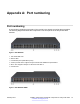

Table Of Contents
- Contents
- Chapter 1: Introduction
- Chapter 2: New in Release 4.1
- Chapter 3: Safety and equipment care
- Chapter 4: SFP
- SFP transceivers
- SFP specifications
- SFP labels
- General SFP specifications
- Supported SFP transceivers
- 1000BASE-T SFP specifications
- 1000BASE-SX DDI SFP specifications
- 1000BASE-LX DDI SFP specifications
- 1000BASE-XD DDI 1310 nm SFP specifications
- 1000BASE-XD DDI 1550 nm SFP specifications
- 1000BASE-ZX DDI 1550 nm SFP specifications
- 1000BASE-XD DDI CWDM (40 km) SFP specifications
- 1000BASE-ZX DDI CWDM 70 km SFP specifications
- 1000BASE-BX bidirectional SFP transceivers
- 1000BASE-EX DDI SFP specifications
- 100BASE-FX SFP specifications
- Chapter 5: SFP+
- SFP+ transceivers
- SFP+ specifications
- SFP+ labels
- General SFP+ specifications
- Supported SFP+ transceivers
- 10GBASE-LR/LW SFP+ specifications
- 10GBASE-LR/LW SFP+ high temperature (-5 °C to +85 °C) specifications
- 10GBASE-ER/EW SFP+ specifications
- 10GBASE-SR/SW SFP+ specifications
- 10GBASE-SR/SW SFP+ high temperature (0 °C to +85 °C) specifications
- 10GBASE-ZR/ZW SFP+ specifications
- 10GBASE-LRM SFP+ specifications
- 10GBASE-CX specifications
- 10GBASE-ER CWDM SFP+ specifications
- Chapter 6: Translations of safety messages
- Class A electromagnetic interference warning statement
- Electrostatic discharge caution statement
- Laser eye safety danger statement
- Laser eye safety connector inspection danger statement
- Connector cleaning safety danger statement
- Optical fiber damage warning statement
- Optical fiber connector damage warning statement
- SFP damage warning statement
- Appendix A: Port numbering
- Glossary

1. VSP 4000 USB cover
2. Switch LEDs
3. 10/100/1000 PoE+ ports (LEDs above ports)
4. Combo port SFP slots. Supports Avaya 1G SFPs and 100Base low speed SFPs.
5. SFP+ slots. Supports Avaya’s 1G SFPs and 10G SFP+s.
6. Console Port
Figure 6: VSP 4450GSX-PWR+
1. VSP 4000 USB port
2. Switch LEDs
3. 10/100/1000 Base TX RJ-45 ports with PoE+ (LEDs above ports)
4. 100/1000 Mbps SFP transciever modules
5. 1/10G SFP + ports
6. Console Port
Figure 7: VSP 4450GTX-HT-PWR+
1. VSP 4000 USB port but without a USB or a USB device cover
Note:
The VSP 4450GTX-HT-PWR+ model does not require a USB device in the USB port for normal
operation. The USB port can be used for additional storage using a USB memory stick.
2. Switch LEDs
3. 10/100/1000 Base TX RJ-45 ports with 802.3at PoE+
Table continues…
Port numbering
60 Installing Transceivers and Optical components on Avaya VSP 4000 February 2015
Comments? infodev@avaya.com